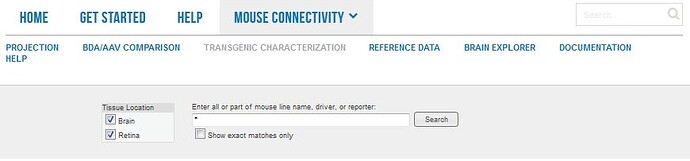
From this tab you can browse and select from reporter lines and driver lines used in the creation of the Allen Mouse Brain Connectivity Atlas.
Searching
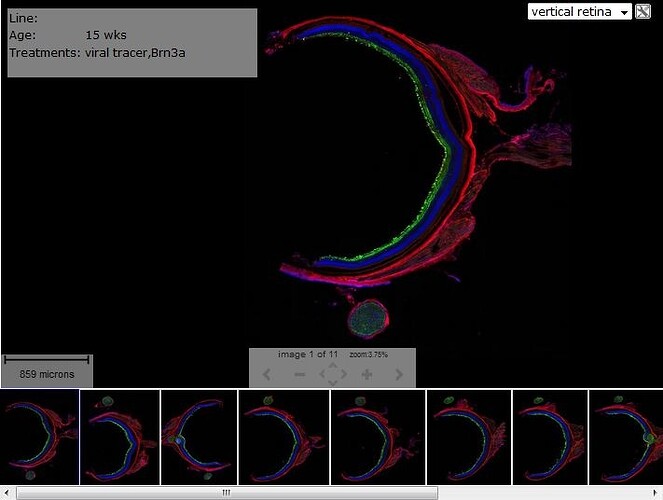
Search the Transgenic Mouse dataset by entering a gene symbol or mouse line name into the search box. Retinal Projectome data includes four experiments with vertical mount sections of the retina. You will be prompted with suggestions once you have started typing. Click “Search” or hit the Enter key.
You can also browse through the data using tabs on the search page that illustrate all of the Driver Lines and Reporter Lines used in this resource.
Driver Lines
Each driver line is represented by its name, a representative image (which is magnified when clicked) and a description of expression. Clicking on the line name will return results from all characterization experiments for that particular line.
Reporter Lines
This tab lists all the characterized reporter lines with a description of their expression patterns.
Retinal Projectome
Representative retinas were sectioned in the vertical plane for characterization of morphology and co-localization with markers for well defined retinal ganglion cell (RGC) types. Four markers were used:
VAChT (vesicular acetylcholine transporter) - a marker of inner plexiform layers,
CART (cocaine-amphetamine related transcript) - a marker of ON/OFF direction selective retinal ganglion cells,
OPN osteopontin - a marker of large/ dephosphorylated neurofilament-positive RGCs,
Brn3a which labels ~80% of all RGCs and is a Pit/Oct/Unc (POU) domain transcription factor.
Each experiment shows the GFP viral tracer infection in green, the marker in red and a DAPI stain in blue.
Search Results
Clicking on Search will return a list of experiments based on your search criteria with information on the Experiment ID, Line Name, Driver, Reporter, Probes, Age, Sex, Treatments and Image Count. Click on the Experiment ID to be taken to the Experiment Detail Page
To compare multiple experiments, mark the checkboxes to the left of each row, then click the “Compare Selected Experiments” button. Note: the selection list may contain previously selected experiments from the “Projection” or “BDA/AAV” studies. Your choices are stored in a browser ‘cookie’ on your computer and will remain in effect until you click the “Clear Selections” button, or clear your Web browser cookie cache.
Experiment Detail Page
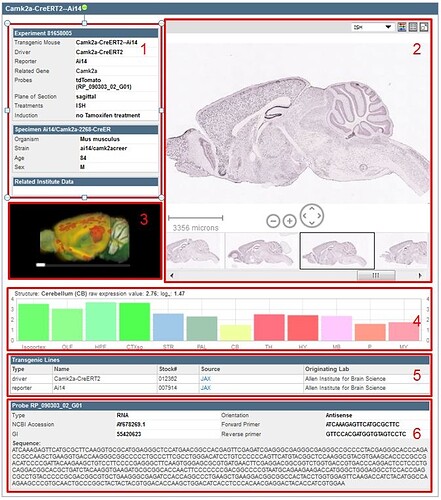
Clicking on the experiment summary link returns a summary of the experimental details (see screenshot).
The various sections of the experimental detail page are outlined 1-6 as follows:
Experimental Metadata: Experiment ID, Transgenic Mouse, Driver, Reporter, Related Gene (click for Adult Mouse data), Probes, Plane of Section, Treatments, Induction; Specimen Data: Specimen ID, Organism, Strain, Age, Sex. Related Institute Data: provides links to related data in other Allen Brain Atlas resources
Image Viewer: Zoom and Pan Viewer
3D Thumbnail Viewer: Rotate using the slider bar under the image
Histogram: Relative gene expression in large structures of the brain (for stages older than P28). Hovering your mouse over the histogram will sync the image in the single image viewer with the section corresponding to that structure and expression.
Transgenic Line Metadata: Transgenic lines involved in this experiment including the Type, Name, Stock #, Source (link to provider), and the Originating Lab.
Probe Information: Probe ID, Type, NCBI Accession, GI, Orientation, Forward Primer, Reverse Primer and Sequence.
Using the Zoom And Pan (ZAP) Image Viewer
The Zoom and Pan (ZAP) Image Viewer is a powerful tool to navigate and view the images in an experiment. The main part of the viewer is an interactive window where an image can be repositioned by dragging with a mouse. Use the scroll wheel, on-screen navigation buttons or the keyboard commands to zoom in or out.
Select other images in the experiment by clicking on a thumbnail image below the main viewer.
Scale Bar
Drag the scale bar with your mouse to the desired location. Click the scale bar text with your mouse to toggle between horizontal and vertical.
Using the ZAP Viewer Toolbar
Use the toolbar to take actions on the image that currently has focus. Toolbar controls include:
Select ISH, Nissl or Expression Energy
Image adjust controls
Display all thumbnail images in a single contact sheet
Use the keyboard to navigate through the image series and synchronize the viewers on the page. Keyboard commands include:
Key
Function
F
Advance to the next image in the series
D
Go back to the previous image in the series
R
Advance to the last image in the series
E
Go back to the first image in the series
A
Zoom in
Z
Zoom out
S
Sync all viewers on the page to the zoom level and location of the active viewer
+
Zoom in. Please note that some keyboards may require the [Shift] key be held down while pressing the [+] key
-
Zoom out
You can also use the arrow keys to pan the current image.
Expression Energy
The expression mask image display highlights those cells that have the highest probability of gene expression using a heat map color scale (from low/blue to high/red).
The Expression Energy was calculated as follows: Within a given area A (voxel or structure), expression energy = (sum of intensity of expressing pixels in A) / (sum of all pixels in A):
Explore More Resources
Documentation
Projection Dataset
Learn about Projection Dataset with comprehensive guides and examples from Allen Institute for Brain Science.
Searching
The Adult Mouse Connectivity Atlas comprises a searchable image database of axonal projections labeled by viral (rAAV) tracers and visualized using serial two-photon tomography.
Search this dataset using:
1. Source Search which allows searching by injection site (Filter source Structure(s)) and filtering by mouse line, tracer type and the presence of Intrinsic Signal Images
2. Target Search a “virtual retrograde” search that finds experiments based both on injection site and projection through a structure of interest
3. Spatial Search a spatial search allows the user to choose either a target signal or injection site based on selecting a voxel through which signal passes
There are example searches in the Browse Data subject box on the landing page to demonstrate the various ways in which relevant data can be found. You can also browse experiments from the 3-D search result visualization. Hovering your mouse over the dots (colored according to the Reference Atlas) NEED LINK HERE will indicate the primary injection structure of that particular experiment.
Please see the Informatics Data Processing whitepaper available in the Documentation tab for more information on the informatics processing performed in this study.
Source Search
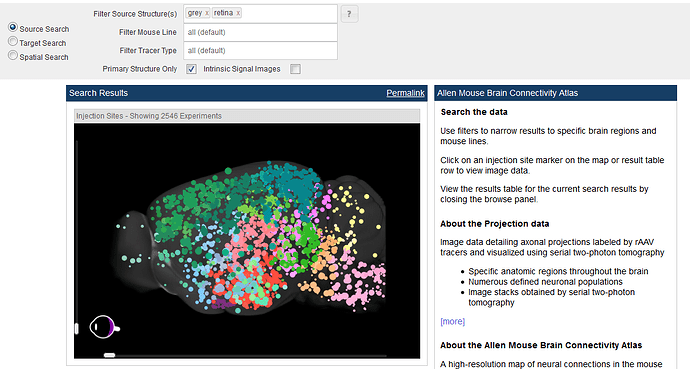
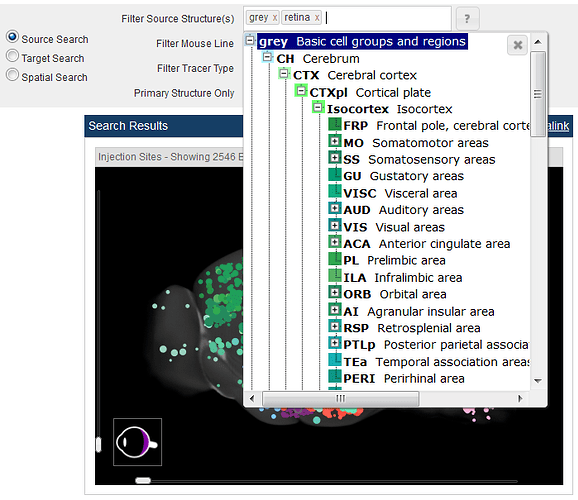
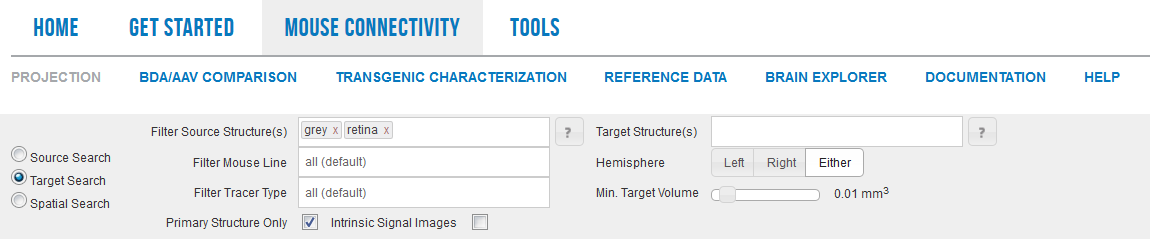
The default view is all experiments throughout the brain (indicated by “grey” and “retina”). To filter your search by injection site, select a structure(s) from the structure ontology that opens when you click in the “Filter Source Structure(s)” text box.
From the Source Search, you also have the option to filter by mouse line or by tracer type. To filter by mouse line, click in the “Filter Mouse Line” text box and select from Wild Type, Cre line or Ai75(RCL-nt) options, or start typing in the text box to search tags from the various Cre-dependent mouse lines. The Ai75 (RCL-nt) option is a reporter strain that we used to target neurons within certain regions. When filtering using the “Filter Tracer Type” text box, you will have the option to choose between EGFP (axonal EGFP) experiments, SypEGFP (synaptophysin-tagged, synaptic EGFP) labeled experiments, or Target EFGP experiments. For more information on this targeting strategy, please see the Overview whitepaper in Documentation.
Although every effort was made to limit the injection site of the viral tracer to a single brain structure, it was often the case that cells in neighboring structures were also infected. We refer to these as “secondary injection structures” and include them in the results list as they may also contain interesting scientific information. To view these experiments as well, uncheck the “Primary Structure Only” box.
As we precisely target the higher visual areas in this data set, experiments utilized Intrinsic Signal Imaging for both guiding injections into the visual cortex, as well as to inform the interpretation of projection pathways. To view experiments that include these data, check the Intrinsic Signal Images box.
As you select filtering parameters, notice that the number of experiments in the 3-D search result visualization decreases to show only the number of experiments that fit your search criteria.
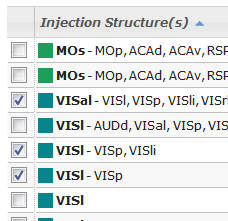
Below the 3-D search result visualization, a list will automatically load with all the experiments that fit your filtering criteria.
This list includes:
Column
Description
Checkbox
Select experiment(s) to view in the context of the reference datasets
Injection Structure
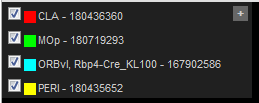
Abbreviations and color of primary injection structure (and secondary structures where applicable)
Mouse Line
Name of the mouse line used
Tracer
Tracer used in this experiment (EGFP, SypEGFP or Target EGFP)
Injection Volume
The volume of the injection site in cubic mm
Clicking on the column headings will sort the list of experiments by that column, clicking twice on a single column will reverse the sort order. Once you have found a relevant group of experiments, you can save or bookmark these search results using the “Permalink” function.
Several experiments can be selected to view side-by-side and/or in the context of our reference data by checking the boxes next to the experiments. Once you have selected the experiments you want to view, click the “View Selections” button. Those experiments will be available in your cart to view in the Experiment Image Viewer until you clear your cache or click the “Clear Selections” button.
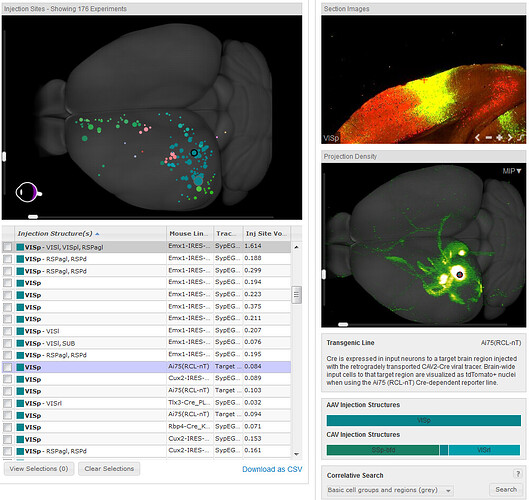
Once you have narrowed your search and want to delve deeper into an individual experiment, open the Experiment Summary View by clicking on a circle in the 3-D search result visualization or an experiment in the list.
Target Search
This search has all the same functional capabilities as Source Search with the added ability to filter your search by limiting the results to experiments where the projection signal passes through a given structure(s).
By default, when you click the “Target Search” radio button, the “Target Structure(s)” search box will open. After selecting one or more structures, selecting a hemisphere, or changing the minimum target volume (defaulted to 0.01 cubic mm), the 3-D search result visualization will automatically update with experiments that fit your filtering criteria. The list of experiments under the 3-D search result visualization includes the following information:
Column
Description
Checkbox
Select experiment(s) to view in the context of the reference datasets
Injection Structure
Name of primary and secondary injection structure(s) including color of the structure according to the reference atlas
Mouse Line
Name of the mouse line used in this experiment
Injection Volume
The volume of the injection site in cubic mm
Target Volume
The volume of signal in the target structure in cubic mm
Experiments are sorted by the target volume, but can be resorted by clicking on a column header. Once you have found a relevant group of experiments, you can save or bookmark these search results using the “Permalink” function.
Several experiments can be selected to view side-by-side and/or in the context of our reference data by checking the boxes next to the experiments. Once you have selected the experiments you want to view, click the “View Selections” button. Those experiments will be available in your cart to view in the Experiment Image Viewe until you clear your cache or click the “Clear Selections” button.
Once you have narrowed your search and want to delve deeper into an individual experiment, open the Experiment Summary View by clicking on a circle in the 3-D search result visualization or an experiment in the list.
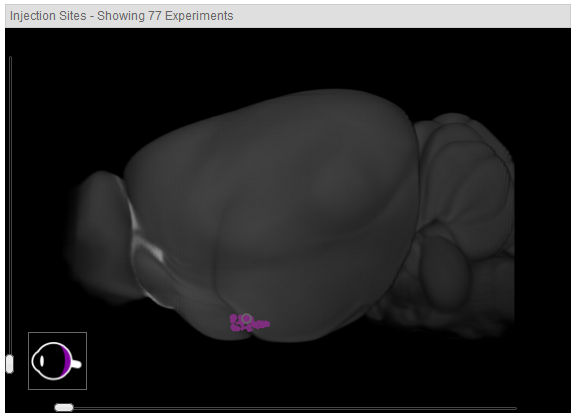
Notice that experiments in the retina can be highlighted by hovering over the eye in the lower left-hand corner of the 3-D visualization or can be selected by clicking on one of the spheres indicating the entry point into the brain.
Spatial Search
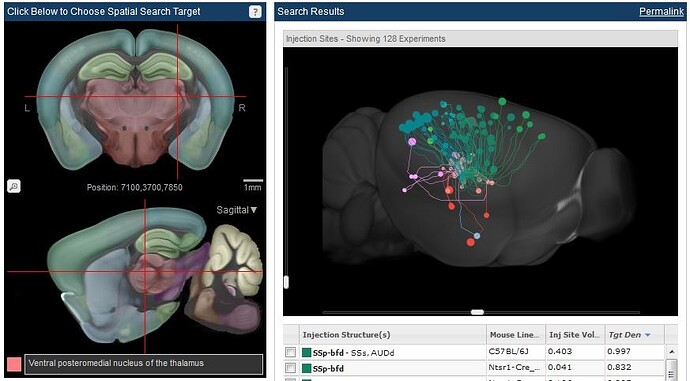
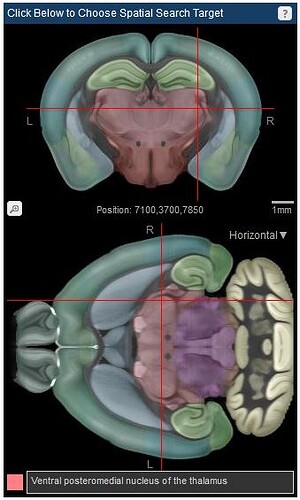
Clicking the “Spatial Search” radio button allows you to do a voxel-based “virtual retrograde” search, or search for injection sites in close proximity to a selected voxel. The default view is pointed to a voxel in the ventral posterolateral nucleus of the thalamus, as indicated by the cross hairs in the multiplanar viewer. The 3-D search result visualization depicts all the injection sites with projection signal through the chosen structure. The approximate injection site is depicted with a sphere and the approximate pathway is traced with a line the same color as the injection site.
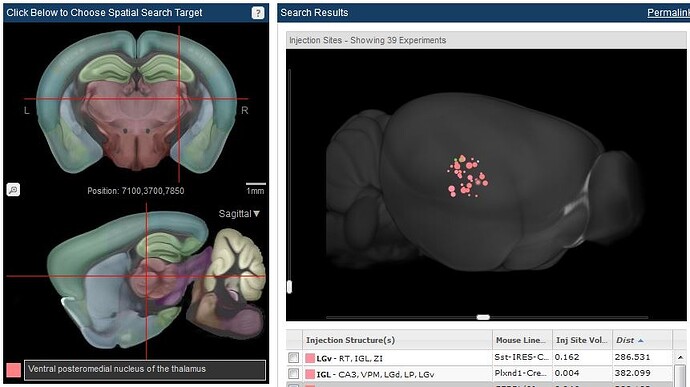
Selecting the “Find Injection Sites” filter will bring up a threshold bar that will allow you to search for injection sites within a specified distance from your cross-hair location.
Click and drag the cross hairs in the multiplanar viewer to select a voxel in a particular structure. Once you have chosen a structure, you can further filter your search by selecting a mouse line and/or filtering by primary injection structure. The resulting list of experiments will include:
Column
Description
Checkbox
Select experiment(s) to view in the context of the reference datasets
Injection Structure
Name and color of primary injection structure, and secondary injection structures (where applicable)
Mouse Line
Name of the mouse line used in this experiment
Injection Volume
The volume of the injection site in cubic mm
Target Density
The density of signal in the target structure as a ratio of pixels with signal over all pixels in the structure
Using the Multiplanar Viewer to Search
The voxel-based Spatial Search is carried out by using the multiplanar viewer. This viewer illustrates the Allen Mouse Common Coordinate Framework (CCF) and incorporates structures drawn in 3 dimensions: see the Mouse CCF whitepaper in Documentation. Access to the horizontal view is via the drop-down menu in the sagittal view.
Experiment Summary View
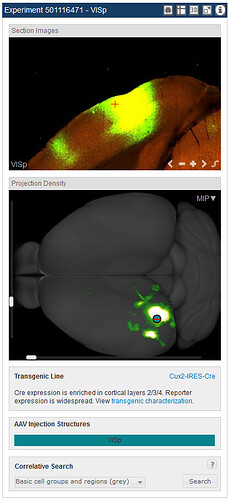
Hovering your mouse over an experiment will highlight that injection site in the 3-D search result visualization. Rotating the image in either the horizontal or vertical planes gives better access to view the selected experiments. To take a closer look at a particular experiment, click on that experiment, either in the list or on the 3-D search result visualization. Once an experiment has been chosen in this manner, a new panel of images and options will load on the right labeled by the Experiment ID number and the injection site structure. This view includes a section images viewer, a projection density image viewer, a transgenic characterization box, an injection summary for the rAAV virus injection and the targeting CAV injection summary (when appropriate) and a correlative search box. Characterization of the transgenic lines used in this study has been carried out, and can be inspected from the link in the Transgenic Characterization box. If viewing an experiment from the Retinal Projectome, a whole mount view of the retina is available from a link in the Transgenic Line box. Experiments that show a similar signal pattern to the current experiment can be searched for using the Correlative Search.
Advanced search features are available from the icons in the toolbar of the experiment panel and include:
Open the experiment in a Cortical Map Viewer also where Intrinsic Signal Images (when available) will be displayed
Shortcut key to conduct a Spatial Search from the point indicated by the cross hairs
Open the experiment in the 3-D Brain Explorer software
Open the experiment in a High Resolution Image Viewer
Open quantification of the signal in the Experimental Detail page
Section Images Viewer
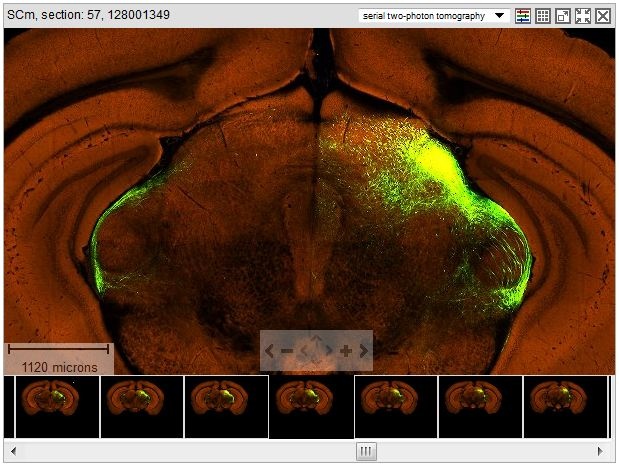
The section images viewer shows the 2-D fluorescence images in both the green (signal) channel and the red (autofluorescence) channel. Navigation (panning and zooming) through these images is achieved by using the on-screen navigation tools or using the Keyboard Commands. This project utilizes extensive informatics processing and the informatics signal calculated by subtracting the background signal (segmentation images) can be viewed by clicking the icon (see below).
View Segmentation Icon
Projection Density Image Viewer
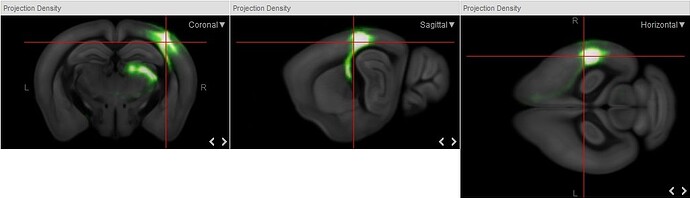
This view shows an interactive 3-D thumbnail view of the experiment in what is referred to as the Maximum Intensity Projection (MIP) view. By default, a cross hair and sphere indicates the center of the injection site. Clicking on any other position in the MIP view will move the cross hair to the site selected both in the MIP view as well as in the 2-D view in the section image view. As selecting a point in a 3-D image can become problematic, you also have an option to view the intensity projection in 2-D from the drop-down menu that opens when you click on “MIP”. These views show the signal intensity against the two dimensional view of the Allen Mouse Common Coordinate Framework (CCF). For more information on the CCF, please see the whitepaper in the Documentation tab.
The left (L) and right (R) sides of the brain are labeled in these views and navigation to the next section is achieved by clicking the < and > on-screen navigation buttons.
An example of the segmentation view is illustrated in the image to the right. For more information on the informatics processing in this project, please see the Informatics Data Processing whitepaper available from the Documentation tab.
Correlative Search
Once you have found a relevant experiment, another useful search is for any other experiments that may show similar projection patterns. The correlative search allows you to look for similar patterns with an experiment of interest either by comparing brain wide (default), or by selecting fiber tracts or one of the other 12 major curated brain divisions available from the drop-down menu.
Cortical Map Viewer
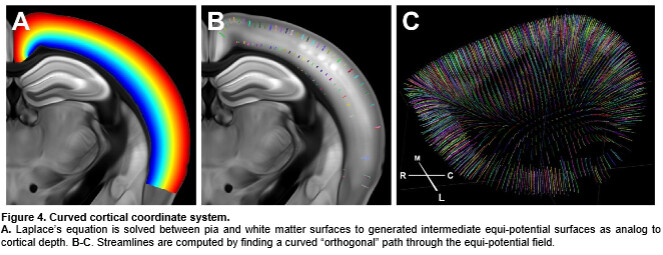
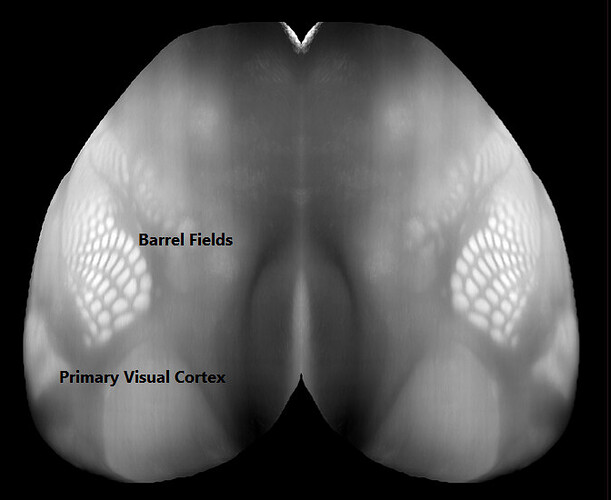
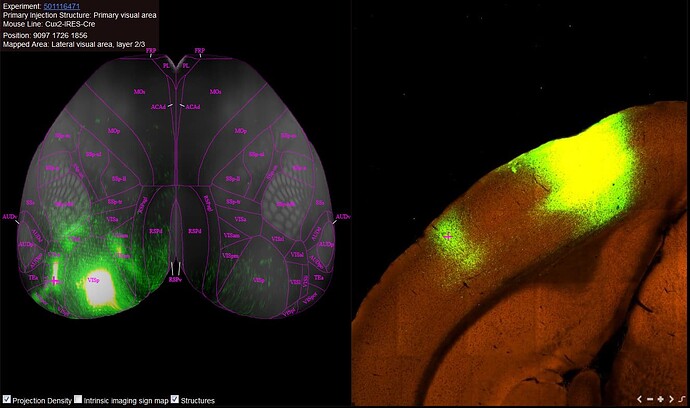
In order to enable the integration of information from different cortical depths, we constructed a curved cortical coordinate system. This coordinate system allows us to project structural features in the cortex, which are often oriented orthogonally to the surface, in a two dimensional plane that preserves structural integrity. When viewing projections in the Cortical Map, you are viewing the cortex along a “streamline” (see figure below and CCF whitepaper in Documentation.
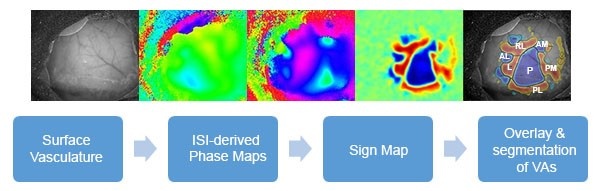
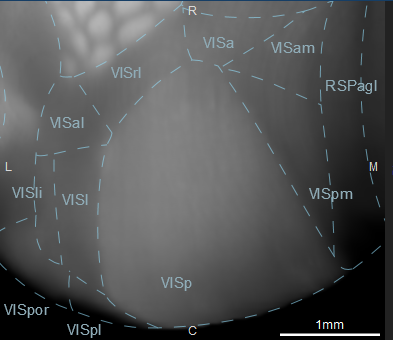
When viewing this curved cortical coordinate system in two dimensions, structures such as the barrel fields in the somatosensory cortex and the primary visual cortex become visually distinct. While the curved cortical map nicely delineates the primary visual cortex, the associated visual areas are not so easily mapped. To further delineate these areas, Intrinsic Signal Imaging was performed during a visual stimulus to create sign maps for each individual brain.
For more information on how the sign maps were generated, please see the Overview whitepaper in Documentation. The March 2016 data release was the first to include experiments that used sign maps to both target infection to specific visual areas as well as interpret projection from other brain regions to the visual areas.
Viewing Projection Experiments
Experiments without Intrinsic Signal Imaging (ISI)
When viewing an experiment of interest, you can visualize that experiment in the cortical map by clicking on the cortical map icon.
Note: only the projection signal in the cortex is visible in the Cortical Map viewer.
The cross-hairs on the Cortical Map indicate the location of the 2-D image from the experiment to the right. Navigation to other locations in the experiment is from either the on-screen navigation icons, or by double-clicking on the Cortical Map itself. Once a location has been chosen, the experimental ID, primary injection site, mouse line, position (in microns) and the location mapped to the reference atlas will show up in the left-hand corner of the screen. Clicking on the experimental ID link will take you to the Experimental Detail Page. Only the Projection Density and Structures checkboxes will be available for experiments without ISI.
Experiments including Intrinsic Signal Imaging (ISI)
To see experiments that include ISI, make sure to check the “Intrinsic Signal Images” box in your initial search. Once an experiment with ISI has been selected, a radio button will appear which allows overlay of the projection and ISI views.
The cross-hairs on the Cortical Map indicate the location of the 2-D image from the experiment to the right (not shown). Navigation to other locations in the experiment is from either the on-screen navigation icons, or by double-clicking on the Cortical Map itself. Once a location has been chosen, the experimental ID, primary injection site, mouse line, position (in microns) and the location mapped to the reference atlas will show up in the left-hand corner of the screen. Clicking on the experimental ID link will take you to the Experimental Detail Page.
Experimental Detail Page
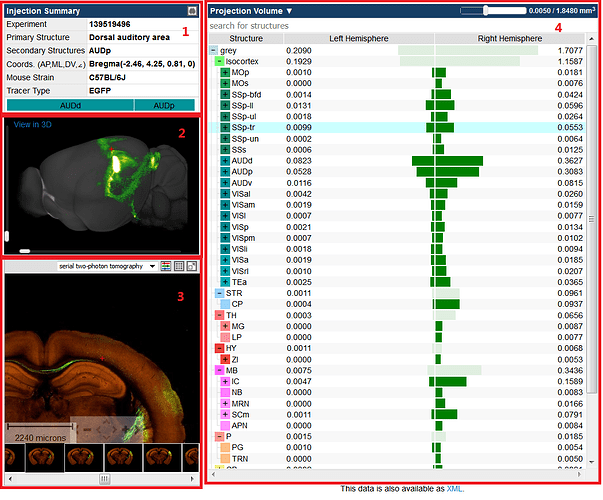
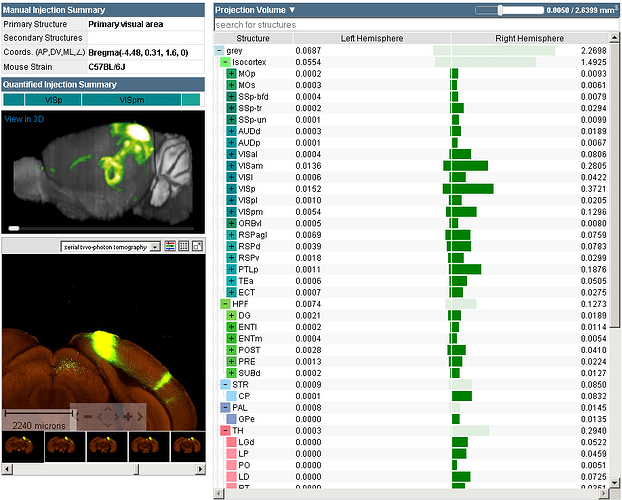
The experimental detail page illustrates the projection experiment in an informatically quantified fashion. This page contains the Injection Summary(ies), a Projection Density Image Viewer, a Section Images Viewer, and a histogram quantifying the signal in each region, displayed either by Projection Volume or Projection Density.
1. Injection Summary: This section includes a link to the Cortical Map Viewer from the icon in the top right-hand corner and lists the experiment ID, primary and secondary injection structure(s), the coordinates of the injection, the mouse strain, tracer type and the calculated injection summary (%) for the rAAV injection and the CAV injection (where appropriate). If the experiment was targeted stereotaxically, the coordinates are from a registration point (typically Bregma) in the anterior/posterior, dorsal/ventral, medial/lateral orientations and the angle of injection (AP, ML, DV, <). If the experiment was targeted using ISI, the coordinates will read “ISI(0, 0, DV, <)” indicating the depth and angle of injection (see Overview whitepaper in Documentation). If the experiment shown is from a transgenic line, you will also have a description of the infected cells and a link to the Transgenic Characterization of that line.
2. Projection Density Image Viewer: This viewer offers a rotating preview of the projection signal in 3 dimensions. Click the “View in 3D” link to view the experiment in the Brain Explorer software.
3. Section Images Viewer The Section Images viewer allows you to browse the experiment in 2-D. You can scroll through thumbnails of each section, zooming in or out and panning through areas of interest.
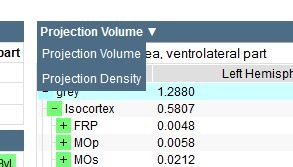
4. Histogram: This section illustrates the quantified signal in each structure either by projection volume (mm3) or by projection density (fraction of area occupied by signal compared to the whole structure). Toggle the two representations of the data using the drop down menu at the top of the histogram. The selected structure ontology can be expanded or collapsed and the number of structures shown can be changed using the threshold slider bar at the top of the histogram. When you click on a structure in the histogram, you will be taken to that area of the brain in the 3-D and 2-D image viewers. A red cross-hair pinpoints the center of that structure in each of the image viewers.
Data from this page can be downloaded as XML.
Experiment Image Viewer
To view several experiments in a single window, check the boxes next to experiments of interest from the various search methods. Once you have selected “View Selections” a window will open with all your checked experiments. The experiment image view displays images for each selected experiment in a Section Images viewer. This view makes it easy to compare experiments with each other and with the associated reference atlas, and with the Reference Data.
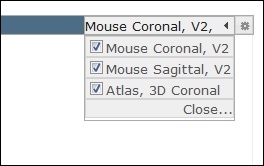
Multiple image series can be opened on the same page to enable side-by-side comparisons. Arrange the experiments by dragging an image viewer by the title bar and dropping into a new location. Add a reference atlas by selecting one from the “Atlases” drop-down menu in the upper-right hand corner of the window (see screenshot).
If you are viewing more than one experiment, open the configuration options to change the number of columns displayed in the window. The configuration options are accessible by clicking on the button with a “gear” icon to the right of the “Atlases” menu.
The injection site, section number and experiment ID are displayed in the title bar. Experiments using transgenic mice will also report the name of the transgenic line. Icons in the toolbar allow for you to take actions on the current image.
To view an overlay of each of the selected experiments in the Experiment Image Viewer, click on the Composite Projection Viewer in the title bar.
Using the Section Images Viewer
The Section Images Viewer is a powerful tool to navigate and view the images in an experiment. The main part of the viewer is an interactive window where an image can be repositioned by dragging with a mouse. Use the scroll wheel, on-screen navigation buttons or the keyboard to zoom in or out.
Thumbnails for the entire image series are displayed across the bottom of the viewer in section order. Click a thumbnail to select it for viewing, or use the keyboard to navigate through the set. The current selection is outlined in black.
Scale Bar
Drag the scale bar with your mouse to the desired location. Click the scale bar text with your mouse to toggle between horizontal and vertical scale bars.
Using the Section Images Viewer Toolbar
Use the toolbar to take actions on the current image. Toolbar controls include:
Select between raw data and projection segmentation images
Adjust image controls
View all images in this experiment in a Contact Sheet Viewer
Synchronize all other section image viewers on the page that support synchronization to the currently selected image
Close the Section Images viewer
Keyboard Commands
Use the keyboard to navigate through the image series and synchronize the viewers on the page. Keyboard commands include:
Key
Function
A
Zoom in
Z
Zoom out
F
Step forward through the thumbnail images keeping the same location and scale
D
Step backward through the thumbnail images keeping the same location and scale
S
Sync all viewers on the page to the zoom level and location of the active viewer
+
Zoom in. Please note that some keyboards may require the [Shift] key be held down while pressing the [+] key
-
Zoom out
You can also use the arrow keys to pan the current image.
Composite Projection Viewer
The Composite Projection Viewer allows you to see several projection experiments overlaid on the reference brain. This view allows you to sync experimental images with the reference atlas and other reference data.
The elements of this viewer include:
Toggle between the individual image viewers and the composite viewer
Add the coronal or sagittal reference atlas (will display below the Composite View) or change the number of columns (from the “gear”)
The Composite View. Clicking the “+” in the top left-hand corner will open up images of each experiment
Display reference data such as the annotated reference atlas or histochemical stains that was already in your viewing cart
Composite View
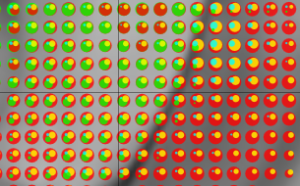
The composite view illustrates each selected experiment in an arbitrary color as circles based on the signal density in that voxel. Navigate the image viewer using the onscreen navigation tools or the options in the toolbar.
Composite View Toolbar
Choose your orientation - coronal, sagittal or horizontal
Change the size of the circle (0-3 Ergs)
Move through the sections with the slider bar (microns)
Sync composite image to the reference data
See selected experiments in the Brain Explorer 3-D Viewer
Contact Sheet Viewer
The contact sheet viewer shows serial sections of the selected experiment. Background fluorescence in the red channel illustrates basic anatomy and structures of the brain, and the injection site and projections are shown in the green channel.
High Resolution Image Viewer
The High Resolution Image Viewer is launched from the contact sheet display or from clicking the icon in the Section Images Viewer and allows you a closer look at the image data.
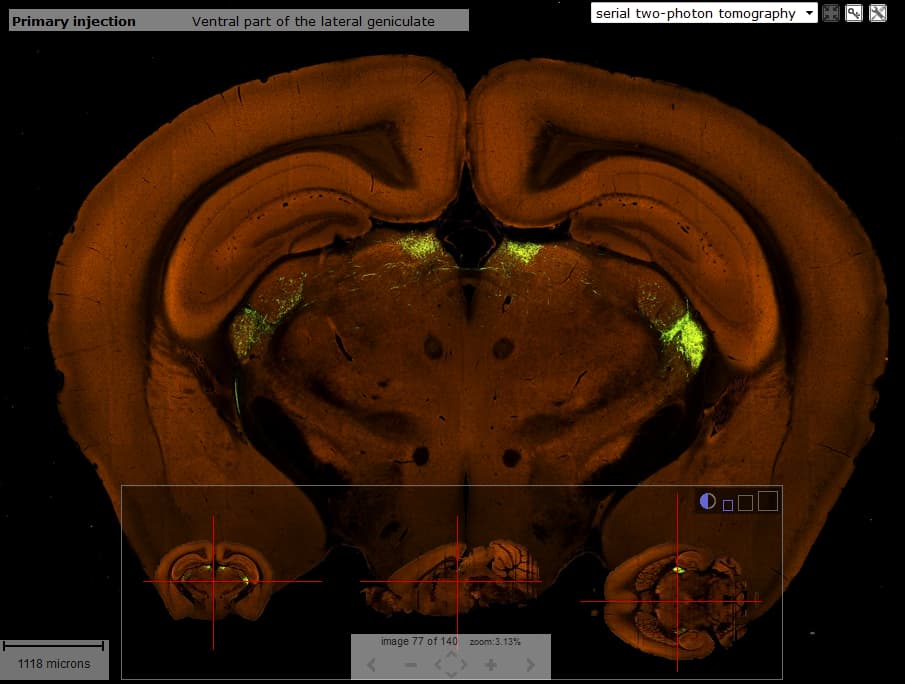
The High Resolution Image Viewer consists of the main image viewer, a scale bar, and a multi-planar viewer. The primary injection site is listed in the title bar in the image viewer. The multi-planar viewer shows the three orthogonal views of the fluorescent projection; the coronal sections generated by two-photon tomography, and the sagittal and horizontal planes that were reconstructed from the coronal sections. Cross-hairs indicate the current location in the main viewer. Navigation of the main coronal image is via clicking on the planar views or by using the keyboard commands.
In the title bar are icons that allow you to interact with the main viewer.
A dropdown menu to view projection or segmentation images
Clicking on this icon will bring up a side by side synced view of the Interactive Atlas Viewer
Clicking on this icon will open a drop-down menu where you can; download an image, adjust the image controls, remove the title bar or remove the multiplanar viewer
The multiplanar viewer can be enlarged by clicking on the 3 varied sized boxes in the top-right corner of the viewer. Clicking on the circle in this toolbar toggles the transparency of the multiplanar viewer so that you can see the image in the main viewer behind the multiplanar viewer or not.
Keyboard Commands
In the High Resolution Image Viewer, use the keyboard commands to navigate through the image series to keep desired zoom and pan selections activated. Keyboard commands include:
Key
Function
A
Zoom in
Z
Zoom out
F
Step forward through the thumbnail images keeping the same location and scale
D
Step backward through the thumbnail images keeping the same location and scale
S
Sync all viewers on the page to the zoom level and location of the active viewer
+
Zoom in. Please note that some keyboards may require the [Shift] key be held down while pressing the [+] key
-
Zoom out
You can also use the arrow keys to pan the current image.
Image Controls
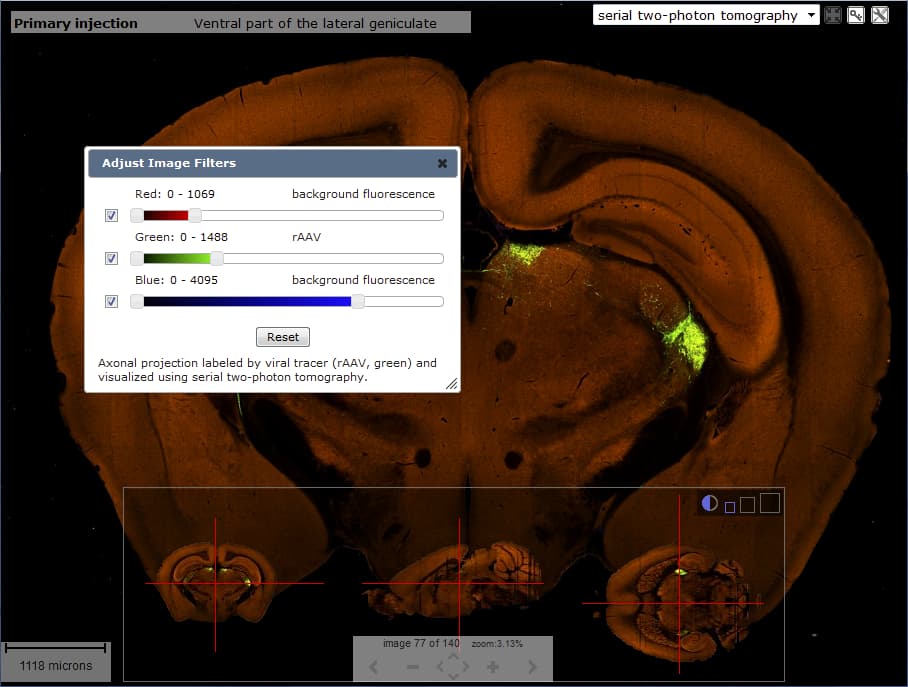
When the “Color Adjustment…” is chosen from the tool icon drop-down menu, you will be presented with a window that allows you to adjust the dynamic range of each channel with a slider bar. What each color represents is outlined above each slider bar and you can exclude any of the channels by unchecking the box next to the slider bar. Once you have adjusted the properties of any channel, you can reset to the default settings by pressing the ‘Reset’ button.
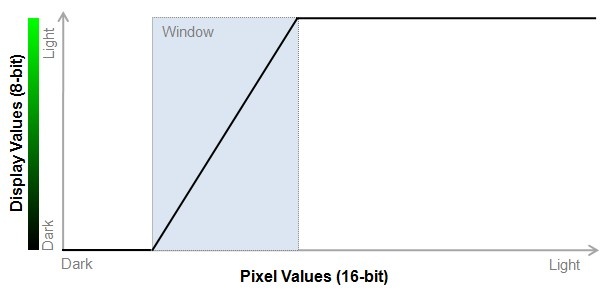
Each serial two-photon tomography image is stored as a three channel Red-Green-Blue (RGB) image with 16-bit per channel resolution. Since web browsers only support 8-bit viewing, we use intensity windowing to compress 16-bit data to 8-bit data. All pixel values below the specified minimum are displayed as black, pixel values above the specified maximum are displayed as green (or red/ blue depending on the channel). The pixel values in between are linearly stretched over the 8-bit range.
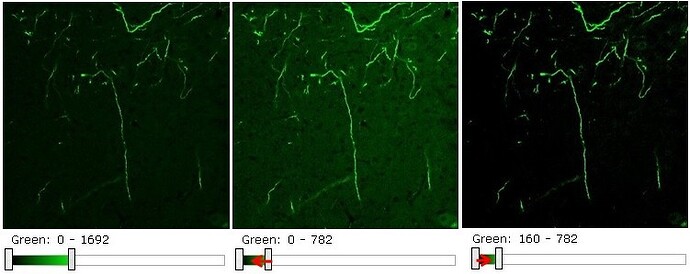
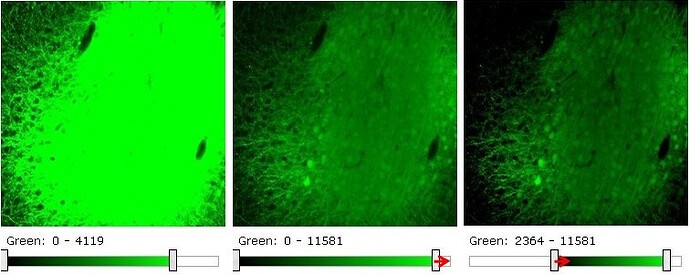
To make an image appear brighter, move the window sliders to the left, to make an image darker move the window sliders to the right. To increase contrast, move the sliders towards each other, to decrease contrast move the sliders away from each other.
The image below gives an example of how to brighten an image to enhance low intensity projections.
This next example shows how to darken and increase contrast of an image to look at details at the injection site. Note: turning on the blue channel may increase the resolution of individual cell-bodies at the site of infection.
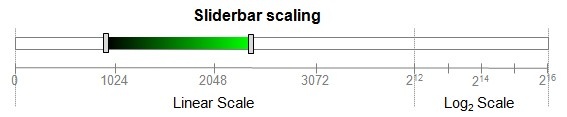
Note: the first three-quarters of the slider-bar represents the lower (0,4095) pixel value range in linear scale. The last quarter of the slider-bar represents the remaining upper (4096, 65535) range in log2 scale. The dual scaling allows for a compact representation of the full range, while allowing for fine-scale control at the lower end.
Learn about API Allen Brain Connectivity Atlas with comprehensive guides and examples from Allen Institute for Brain Science.
The primary data of the Allen Mouse Brain Connectivity Atlas consists of high-resolution images of axonal projections targeting different anatomic regions or various cell types using Cre-dependent specimens. Each data set is processed through an informatics data analysis pipeline to obtain spatially mapped quantified projection information.
From the API, you can:
Download Images
Download quantified projection values by structure
Download quantified projection values as 3-D grids
Query the source, target, spatial and correlative search services
Query the image synchronization service
Download atlas images, drawings and structure ontology
This document provides a brief overview of the data, database organization and example queries. API database object names are in camel case. See the main API documentation for more information on data models and query syntax.
Experimental Overview and Metadata
Experimental data from the Atlas is associated with the “Mouse Connectivity Projection” Product.
Each Specimen is injected with a viral tracer that labels axons by expressing a fluorescent protein. For each experiment, the injection site is analyzed and assigned a primary injection structure and, if applicable, a list of secondary injection structures.
Labeled axons are visualized using serial two-photon tomography. A typical SectionDataSet consists of 140 coronal images at 100 µm sampling density. Each image has 0.35 µm pixel resolution and raw data is in 16-bit per channel format. Background fluorescence in the red channel illustrates basic anatomy and structures of the brain, and the injection site and projections are shown in the green channel. No data was collected in the blue channel.
From the API, detailed information about SectionDataSets, SectionImages, Injections and TransgenicLines can be obtained using RMA queries.
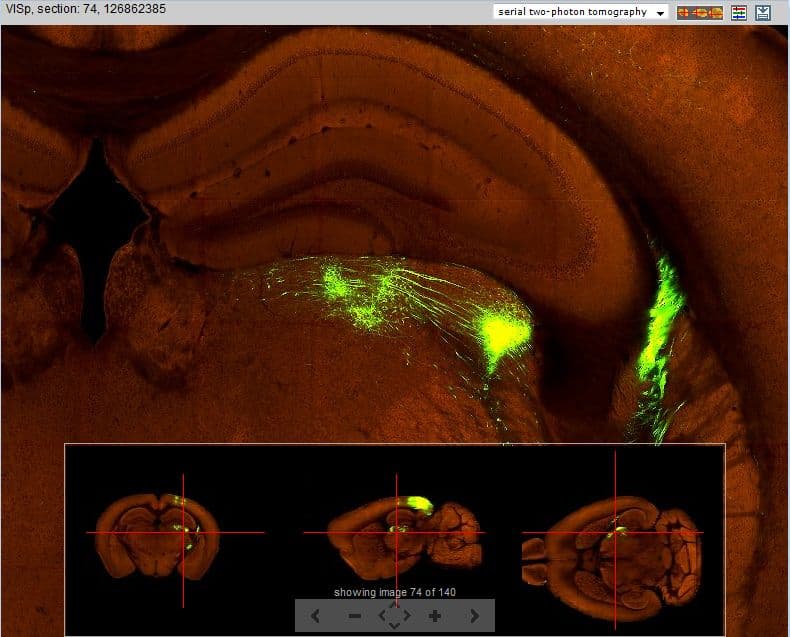
Figure: Projection dataset (id=126862385) with injection in the primary visual area (VISp) as visualized in the web application image viewer.
To provide a uniform look over all experiments, default window and level values were computed using intensity histograms. For each experiment, the upper threshold defaults to (2.33 x the 95th percentile value) for the red channel and (6.33 x the 95th percentile value) for the green channel. The default threshold can be used to download images and/or image region in 8-bit per channel image format.
In the web application, images from the experiment are visualized in an experimental detail page. All displayed information, images and structural projection values are also available through the API.
Informatics Data Processing
The informatics data processing pipeline produces results that enable navigation, analysis and visualization of the data. The pipeline consists of the following components:
an annotated 3-D reference space,
an alignment module,
a projection detection module,
a projection gridding module, and
a structure unionizer module.
The output of the pipeline is quantified projection values at a grid voxel level and at a structure level according to the integrated reference atlas ontology. The grid level data are used downstream to provide a correlative search service and to support visualization of spatial relationships. See the informatics processing white paper for more details.
3-D Reference Models
The cornerstone of the automated pipeline is an annotated 3-D reference space. For this purpose, a next generation of the common coordinate framework (CCF v3) is being created based on an average population of 1675 specimens. See the Allen Mouse Common Coordinate Framework whitepaper for detailed construction information. In this current release, the framework consists of 207 newly drawn structures spanning approximately half the brain. To support whole brain quantification, structures which have not yet been drawn are extracted and merged from the version 2 framework based on the Allen Reference Atlas. The interfaces between old and new structures were manually inspected and filled to create smooth transitions to create a complete brain map (~700 structures) for quantification.
Figure: The next generation Allen Mouse Common Coordinate Framework is based on shape and intensity average of 1675 specimens from the Allen Mouse Brain Connectivity Atlas. At the time of the October 2016 release, 207 structures have been delineated on the anatomical template.
Structures in the common coordinate framework are arranged in a hierarchical organization. Each structure has one parent and denotes a “part-of” relationship. Structures are assigned a color to visually emphasize their hierarchical positions in the brain.
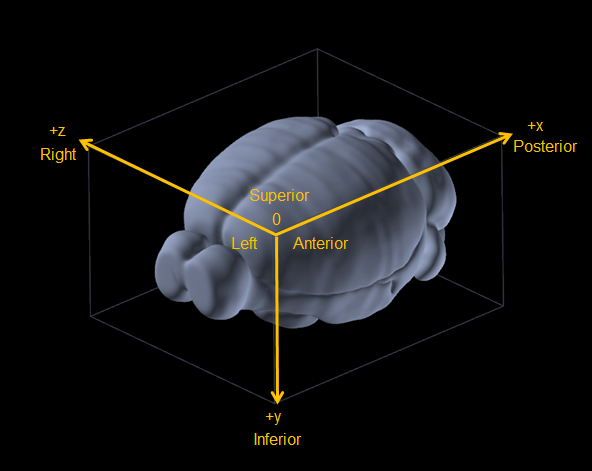
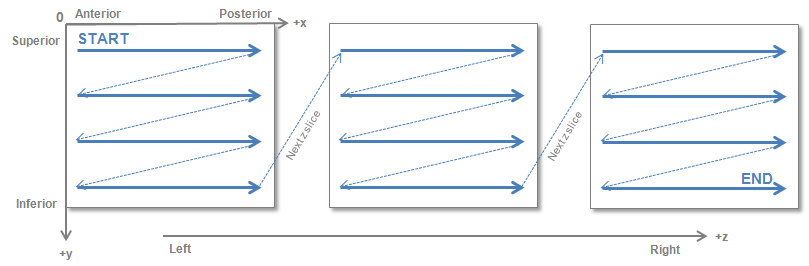
All SectionDataSets are registered to ReferenceSpace id = 9 in PIR orientation (+x = posterior, +y = inferior, +z = right).
Figure: The common reference space is in PIR orientation where x axis = Anterior-to-Posterior, y axis = Superior-to-Inferior and z axis = Left-to-Right.
3-D annotation volumes were updated in the October 2017 release to include newly drawn structures in the Allen Mouse Common Coordinate Framework (CCFv3).
UINT (32 bit) structure annotation extracted from the P56 Allen Developing Mouse Brain Reference Atlas and deformably registered to CCFv3
Each data type is available in multiple voxel resolutions:
Voxel Resolution
Volume Dimension (AP,SI,LR)
10µm sotropic
1320, 800, 1140
25µm isotropic
528, 320, 456
50µm isotropic
264, 160, 228
100µm isotropic
132, 80, 114
All volumetric data is compressed NRRD (Nearly Raw Raster Data) format. The raw numerical data is stored as a 1-D array raster as shown in the figure below.
Example Matlab code snippet to read in the 25µm template and annotation volumes:
% -------------------------------%% Download a NRRD reader% For example:% http://www.mathworks.com/matlabcentral/fileexchange/50830-nrrd-format-file-reader%% Requires: MATLAB 7.13 (R2011b)%% Download:% average_template_25.nrrd% ara_nissl_25.nrrd% ccf_2015/annotation_25.nrrd% -------------------------------%% Read image volume with NRRD reader% Note: reader swaps the order of the first two axes%% AVGT = 3-D matrix of average_template% NISSL = 3-D matrix of ara_nissl% ANO = 3-D matrix of ccf_2015/annotation[AVGT, metaAVGT] = nrrdread('average_template_25.nrrd');
[NISSL, metaNISSL] = nrrdread('ara_nissl_25.nrrd');
[ANO, metaANO] = nrrdread('annotation_25.nrrd');
%% Display one coronal sectionfigure;
imagesc(squeeze(AVGT(:, 264, :)));
colormap(gray(256));
axis equal;
figure;
imagesc(squeeze(NISSL(:, 264, :)));
colormap(gray(256));
axis equal;
figure;
imagesc(squeeze(ANO(:, 264, :)));
caxis([1, 2000]);
colormap(lines(256));
axis equal;
%% Display one sagittal sectionfigure;
imagesc(squeeze(AVGT(:, :, 220)));
colormap(gray(256));
axis equal;
figure;
imagesc(squeeze(NISSL(:, :, 220)));
colormap(gray(256));
axis equal;
figure;
imagesc(squeeze(ANO(:, :, 220)));
caxis([1, 2000]);
colormap(lines(256));
axis equal;
Example Python code snippet to read in the 25µm template and annotation volumes:
# -------------------------------# Install pynrrd:# https://github.com/mhe/pynrrd## Download:# average_template_25.nrrd# ara_nissl_25.nrrd# ccf_2015/annotation_25.nrrd# -------------------------------import nrrd
import numpy as np
import matplotlib.pyplot as plt
from PIL import Image
# ---------------------------------# Read image volume with NRRD reader# Note: reader swaps the order of the first two axes## AVGT = 3-D matrix of average_template# NISSL = 3-D matrix of ara_nissl# ANO = 3-D matrix of ccf_2015/annotation# ---------------------------------AVGT, metaAVGT = nrrd.read('average_template_25.nrrd')
NISSL, metaNISSL = nrrd.read('ara_nissl_25.nrrd')
ANO, metaANO = nrrd.read('annotation_25.nrrd')
# ---------------------------------# Save one coronal section as PNG# ---------------------------------slice = AVGT[264, :, :].astype(float)
slice /= np.max(slice)
im = Image.fromarray(np.uint8(plt.cm.gray(slice) * 255))
im.save('output/avgt_coronal.png')
slice = NISSL[264, :, :].astype(float)
slice /= np.max(slice)
im = Image.fromarray(np.uint8(plt.cm.gray(slice) * 255))
im.save('output/nissl_coronal.png')
slice = ANO[264, :, :].astype(float)
slice /= 2000im = Image.fromarray(np.uint8(plt.cm.jet(slice) * 255))
im.save('output/ano_coronal.png')
# ---------------------------------# Save one sagittal section as PNG# ---------------------------------slice = AVGT[:, :, 220].astype(float)
slice /= np.max(slice)
im = Image.fromarray(np.uint8(plt.cm.gray(slice) * 255))
im.save('output/avgt_sagittal.png')
slice = NISSL[:, :, 220].astype(float)
slice /= np.max(slice)
im = Image.fromarray(np.uint8(plt.cm.gray(slice) * 255))
im.save('output/nissl_sagittal.png')
slice = ANO[:, :, 220].astype(float)
slice /= 2000im = Image.fromarray(np.uint8(plt.cm.jet(slice) * 255))
im.save('output/ano_sagittal.png')
Image Alignment
The aim of image alignment is to establish a mapping from each SectionImage to the 3-D reference space. The module reconstructs a 3-D Specimen volume from its constituent SectionImages and registers the volume to the 3-D reference model by maximizing mutual information between the red channel of the experimental data and the average template.
Once registration is achieved, information from the 3-D reference model can be transferred to the reconstructed Specimen and vice versa. The resulting transform information is stored in the database. Each SectionImage has an Alignment2d object that represents the 2-D affine transform between an image pixel position and a location in the Specimen volume. Each SectionDataSet has an Alignment3d object that represents the 3-D affine transform between a location in the Specimen volume and a point in the 3-D reference model. Spatial correspondence between any two SectionDataSets from different Specimens can be established by composing these transforms.
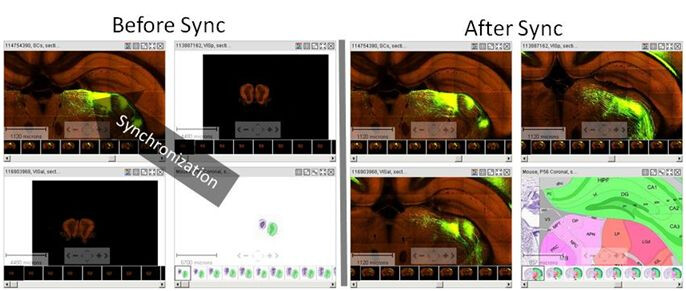
For convenience, a set of “Image Sync” API methods is available to find corresponding positions between SectionDataSets, the 3-D reference model and structures. Note that all locations on SectionImages are reported in pixel coordinates and all locations in 3-D ReferenceSpaces are reported in microns. These methods are used by the Web application to provide the image synchronization feature in the multiple image viewer (see Figure).
Figure: Point-based image synchronization. Multiple image-series in the Zoom-and-Pan (Zap) viewer can be synchronized to the same approximate location. Before and after synchronization screenshots show projection data with injection in the superior colliculus (SCs), primary visual area (VISp) anteolateral visual area (VISal), and the relevant coronal plates of the Allen Reference Atlas. All experiments show strong signal in the thalamus.
Projection Data Segmentation
For every Projection image, a grayscale mask is generated that identifies pixels corresponding to labeled axon trajectories. The segmentation algorithm is based on image edge/line detection and morphological filtering.
The segmentation mask image is the same size and pixel resolution as the primary projection image and can be downloaded through the image download service.
Figure: Signal detection for projection data with injection in the primary motor area. Screenshot of a segmentation mask showing detected signal in the ventral posterolateral nucleus of the thalamus (VPL), internal capsule (int), caudoputamen (CP) and supplemental somatosensory area (SSs). In the Web application, the mask is color-coded for display: green indicates a pixel is part of an edge-like object while yellow indicates pixels that are part of a more diffuse region.
resampled_red.mhd/raw: red background fluorescence
resampled_green.mhd/raw: rAAV signal
resampled_blue.mhd/raw: blue background fluorescence
All volumes have the same dimensions as the 25um adult mouse reference space volume.
Projection Data Gridding
For each dataset, the gridding module creates a low resolution 3-D summary of the labeled axonal trajectories and resamples the data to the common coordinate space of the 3-D reference model. Casting all data into a canonical space allows for easy cross-comparison between datasets. The projection data grids can also be viewed directly as 3-D volumes or used for analysis (i.e. target, spatial and correlative searches).
Each image in a dataset is divided into a 10 x 10 µm grid. In each division, the sum of the number of detected pixels and the sum of detected pixel intensity were collected. A second set of these same summations was computed for the regions manually identified as belonging to the injection site for injection site quantification. The resulting 3-D grid is then transformed into the standard reference space using linear interpolation to generate sub-grid values.
From the summations we obtained measures for:
projection density = sum of detected pixels / sum of all pixels in division
projection energy = sum of detected pixel intensity / sum of all pixels in division
injection_fraction = fraction of pixels belonging to manually annotated injection site
injection_density = density of detected pixels within the manually annotated injection site
injection_energy = energy of detected pixels within the manually annotated injection site
data_mask = binary mask indicating if a voxel contains valid data (0=invalid, 1=valid). Only valid voxels should be used for analysis
For each summation type, grid files can be downloaded at 10, 25, 50 and 100 μm isotropic voxel resolution.
3-D grids were updated in the May 2015 release to reflect the remapping to the new Allen Mouse Common Coordinate Framework (CCFv3), higher resolution computation and a new compress data format. 3-D grids from the October 2014 release (mapped to CCFv2) can be accessed through our data download server (see instructions).
Grid data for each SectionDataSet can be downloaded using the 3-D Grid Data Service. The service returns a compressed NRRD (Nearly Raw Raster Data) 32-bit FLOAT format. To download a particular grid file, the user specifies the SectionDataSet ID, the type of grid and the resolution.
Examples:
Download projection_density for a VISal injection SectionDataSet (id=287495026) at 50 μm resolution
Example Matlab code snippet to read in the 50 µm projection_density grid volume and average_template:
% -------------------------------%% Download a NRRD reader% For example:% http: //www.mathworks.com/matlabcentral/fileexchange/50830-nrrd-format-file-reader%% Requires: MATLAB 7.13 (R2011b)%% Download average_template_50.nrrd% Download projection_density at 50 micron for SectionDataSet id = 287495026%% ---------------------------------%% Read image volume with NRRD reader% Note that reader swaps the order of the first two axes%% AVGT = 3 -D matrix of average_template% PDENS = 3 -D matrix of projection_density% DMASK = 3 -D matrix of data_mask%[AVGT, metaAVGT] = nrrdread( 'average_template_50.nrrd' );
[PDENS, metaPDENS] = nrrdread( '11_wks_coronal_287495026_50um_projection_density.nrrd' );
[DMASK, metaDMASK] = nrrdread( '11_wks_coronal_287495026_50um_data_mask.nrrd' );
% Display one coronal sectionfigure;imagesc(squeeze(AVGT(:, 184 ,:)));colormap(gray( 256 )); axis equal;
figure;imagesc(squeeze(PDENS(:, 184 ,:)));colormap(jet( 256 )); axis equal;
figure;imagesc(squeeze(DMASK(:, 184 ,:)));colormap(gray( 256 )); axis equal;
Example Python code snippet to read in the 50 µm injection_density and injection_fraction and compute an injection centroid:
# -------------------------------## Install pynrrd: https: //github.com/mhe/pynrrd## Download injection_density at 50 micron for SectionDataSet id = 287495026# Download injection_fraction at 50 micron for SectionDataSet id = 287495026## ---------------------------------import nrrd
import numpy as np
import matplotlib.pyplot as plt
import Image
## Read image volume with NRRD reader# Note that reader swaps the order of the first two axes## INJDENS = 3 -D matrix of injection_density# INJFRAC = 3 -D matrix of injection_fraction#INJDENS, metaINJDENS = nrrd.read( '11_wks_coronal_287495026_50um_projection_density.nrrd' );
INJFRAC, metaINJFRAC = nrrd.read( '11_wks_coronal_287495026_50um_injection_fraction.nrrd' );
# find all voxels with injection_fraction >= 1injection_voxels = np.where( INJFRAC >= 1 )
injection_density = INJDENS[injection_voxels]
sum_density = sum(injection_density)
# compute centroid in CCF coordinatescentroid = map( lambda x : sum( injection_density * x ) / sum_density * 50 , injection_voxels)
print centroid
Projection Structure Unionization
Projection signal statistics can be computed for each structure delineated in the reference atlas by combining or unionizing grid voxels with the same 3-D structural label. While the reference atlas is typically annotated at the lowest level of the ontology tree, statistics at upper level structures can be obtained by combining measurements of the hierarchical children to obtain statistics for the parent structure. The unionization process also separates out the left versus right hemisphere contributions as well as the injection versus non-injection components.
Projection statistics are encapsulated as a ProjectionStructureUnionize object associated with one Structure, either left, right or both Hemispheres and one SectionDataSet. ProjectionStructureUnionize can be downloaded via RMA. ProjectionStructureUnionize data is used in the web application to display projection summary bar graphs.
A projection grid service has been implemented to allow users to instantly search over the whole dataset to find experiments with specific projection profiles.
The Source Search function retrieves experiments by anatomical location of the injection site.
The Target Search function returns a rank list of experiments by signal volume in the user specified target structure(s).
The Spatial Search function returns a rank list of experiments by density of signal in the user specified target voxel location.
The Injection Coordinate Search function returns a rank list of experiments by distance of their injection site to a user specified seed location.
The Correlation Search function enables the user to find experiments that have a similar spatial projection profile to a seed experiment when compared over a user-specified domain. The projection grid search service is available through both the Web application and API.
Source Search
To perform a Source Search, a user specifies a set of source structures. The service returns all experiments for which either the primary injection structure or one of its secondary injection structures corresponding to one of the specified source structures or their descendents in the ontology. The search results can also be filtered by a list of transgenic lines.
See the connected service page for definitions of service::mouse_connectivity_injection_structure parameters.
The output of the source search is a xml list of objects. Each object represents one experiment and contains information about the experiment including its unique identifier, the primary injection structure, list of any secondary injection structures, injection coordinates, injection volume and transgenic line name.
Examples:
Source search for experiments with injection in the isocortex
Figure: Screenshot of source search results in the web application for experiments with injection in the isocortex. The injection location of each experiment is shown as a sphere on the 3D injection map.
Target Search
To perform a Target Search, the user specifies a set of target structures. The service returns a rank list of experiments by signal volume in the target structures which are above a minimum threshold. The target structure specification can be further refined by hemisphere. The search results can also be filtered by a list of source structures and/or list of transgenic lines.
See the connected service page for definitions of service::mouse_connectivity_injection_structure parameters.
The output of the target search is a xml list of objects. Each object represents one experiment and contains information about the experiment including its unique identifier, the primary injection structure, list of any secondary injection structures, injection coordinates, injection volume and transgenic line name. Additionally, the total signal volume and number of voxels spanned by the target structure(s) is also reported.
Example:
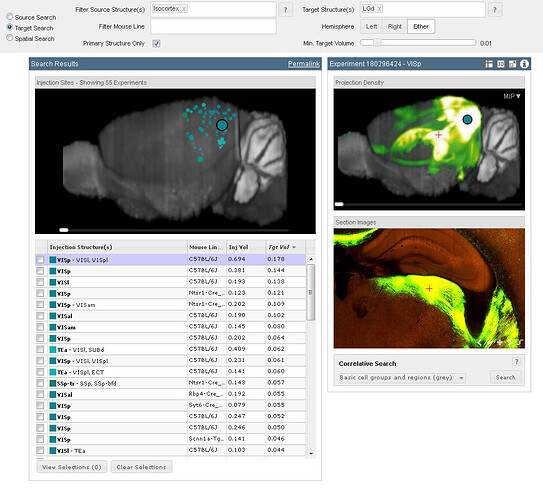
Target search for experiments with projection signal in the target structure LGd (dorsal part of the lateral geniculate complex) and injection in the isocortex
Figure: Screenshot of target search results in the web application for experiments with projection in target structure LGd (dorsal part of the lateral geniculate complex) and injection in the isocortex. The injection location of each experiment is shown as a sphere on the 3D injection map.
Spatial Search
To perform a Spatial Search, a user selects a target location within the 3D reference space. The service returns a rank list of experiments by signal density in the target location and with density greater than 0.1.
See the connected service page for definitions of service::mouse_connectivity_target_spatial parameters.
The output of the target search is a xml list of objects. Each object represents one experiment and contains information about the experiment including its unique identifier, the primary injection structure, list of any secondary injection structures, injection coordinates, injection volume and transgenic line name. Additionally, the path from the target location to the injection site is listed along with signal density at each node.
Example:
Spatial search for experiments with projection signal in a target location in VM (ventral medial nucleus of the thalamus)
Figure: Screenshot of spatial search results in the web application for experiments with projection in target location within VM (ventral medial nucleus of the thalamus). Each line in the 3D map is the computationally generated path from the target location to injection of one experiment.
Injection Coordinate Search
To perform an Injection Coordinate Search, a user specifies a seed location within the 3D reference space. The service returns a rank list of experiments by distance of its injection site to the specified seed location.
See the connected service page for definitions of service::mouse_connectivity_injection_coordinate parameters.
The output of the injection coordinate search is a xml list of objects. Each object represents one experiment and contains information about the experiment including its unique identifier, the primary injection structure, list of any secondary injection structures, injection coordinates, injection volume and transgenic line name. Additionally, distance between the injection site and seed location is also reported.
Example: Injection coordinate search for experiments with a seed location in VM (ventral medial nucleus of the thalamus)
To perform a Correlation Search, the user selects a seed experiment and a domain over which the similarity comparison is to be made. All voxels belonging to any of the domain structures form the domain voxel set. Pearson’s correlation coefficient is computed between the domain voxel set from the seed experiment and every other experiment in the product. The return list is sorted by descending correlation coefficient.
See the connected service page for definitions of service::service::mouse_connectivity_correlation parameters.
The output of the injection coordinate search is a xml list of objects. Each object represents one experiment and contains information about the experiment including its unique identifier, the primary injection structure, list of any secondary injection structures, injection coordinates, injection volume and transgenic line name. Additionally, the Pearson’s correlation coefficient between the experiment and the seed is reported.
Example:
Correlation search for experiment with similar projection profile in the thalamus compared to seed experiment 112670853 (injection in primary motor area of the cortex)
Figure: Screenshot of top returns of a correlation search for experiments with similar projection to a MOp injection experiment (top-left) within the thalamus
Learn about Reference Data Mouse Connectivity with comprehensive guides and examples from Allen Institute for Brain Science.
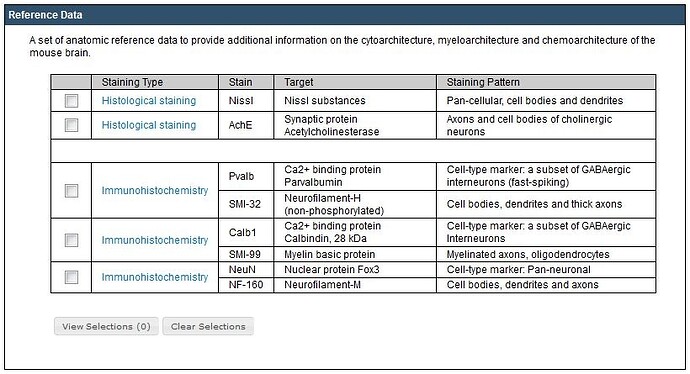
From this tab you can browse from a list of 5 reference dataset experiments. This datasets are also available to add to the cart so you can view them simultaneously with the Projection, BDA vs. rAAV and Transgenic datasets. To select a dataset, click the checkbox and then click “View Selections”. These selections will be stored as a “cookie” in your browser until you click the “Clear Selections” button.
ach reference dataset outlines the stain, the target of the stain as well as the staining pattern. Selecting a reference dataset will return the experiment ID, Mouse Strain, Sex, and Age.
Viewing the Experiments
Clicking on the experiment ID will launch a contact sheet viewer. Double-click an individual image in the contact sheet viewer to launch a High Resolution Image Viewer. The experiment ID, stains and section number are listed on the title banner of the viewer. Navigate through the images via the navigation panel in the main image viewer, or use the Keyboard Commands. To download the image, click the icon (see below).
Download Icon
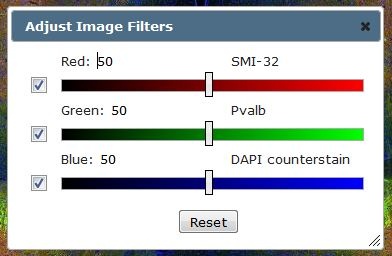
To adjust the image filters, click on the icon in the top right-hand corner of the viewer. The stains used in each channel are listed on the image filter adjustment tool. To turn off a channel, unclick the checkbox next to that channel. Moving the slider bars to the left will decrease the brightness of that channel, while moving the slider bars to the right will increase the channel brightness. Click the reset button to set to default levels.
Keyboard Commands
In the High Resolution Image Viewer, use the keyboard commands to navigate through the image series. Keyboard commands include:
Key
Function
F
Advance to the next image in the series
D
Go back to the previous image in the series
R
Advance to the last image in the series
E
Go back to the first image in the series
A
Zoom in
Z
Zoom out.
+
Zoom in. Please note that some keyboards may require the [Shift] key be held down while pressing the [+] key
-
Zoom out
You can also use the arrow keys to pan the current image.