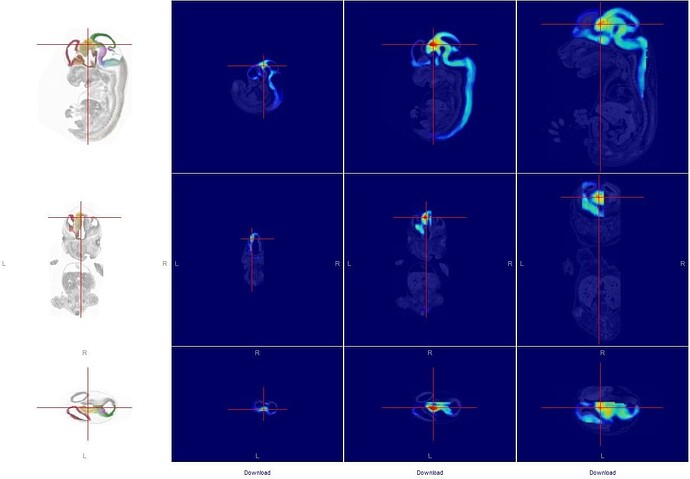
AGEA is an interactive relational atlas based on spatial correlations of gene expression data for ~2000 genes in the Allen Developing Mouse Brain Atlas.
AGEA for the Developing Mouse Brain is used to understand how voxels of the brain are related by gene expression (Correlation), and to find genes expressed at a particular voxel (Gene Finder). Click on the AGEA tab to get started.
Correlation Mode
In correlation mode, use the seed selector to select a starting age by clicking on your age of interest. The next three columns will show you the age you selected flanked by the nearest developmental ages. Also shown in the column headers are the structure and location of the selected voxel and the Pearson’s correlations (please see Informatics whitepaper available from the Documentation tab).
Select a “seed” voxel using the cross hairs in the left hand column from one of the planes of view. The three columns to the right show correlation maps of how other voxels are related to the seed voxel based upon the gene expression of approximately 2000 genes.
Seed Selector
To begin, select an age from the upper left hand corner. Maps of the age-appropriate reference space are shown in sagittal, coronal and horizontal planes in the left-most column. Navigate by clicking on a spot in one plane of view; this will appropriately adjust the other planes of view. Click on the maps to position the red crosshairs on the voxel of interest. Maps are only available for one brain hemisphere, shown by the overlay of reference atlas colors on the Nissl reference space.
Correlation Maps
The correlation maps are shown as heat maps (red is the highest correlation to the seed voxel) with one column for each age. The age chosen with the seed selector is shown, as well as the next youngest and the next oldest ages.
Gene Finder
Once a seed is selected and correlation maps are shown, you can retrieve a list of genes enriched in the region correlated to the seed voxel.
First, click on the “Gene Finder” tab. Then, click on “Find Genes” for the particular age you are interested in.
Search Results
Using the Gene Finder function in AGEA will return a list of genes that fit your search criteria. Searching for genes at an age other than the age chosen in the seed selector will return a list of genes that fit both ages.
Each column includes:
Column
Description
Allows you to select one or more experiments to view by clicking “View Selections”
Fold Change
Fold change of the gene expression in the selected voxel over the thresholded voxels
Gene Symbol
Clicking on this link will take you to the Gene Detail page
Gene Name
Clicking on this name will seed the right panel with the 3-D thumbnail images of this experiment, and allow you to search for other similar genes from the Correlation Search box
Seed Location
A representative image from the age selected in the Seed Selector
Map Location
(If two ages were selected) A representative image from the age selected with Gene Finder
Please refer to the Informatics Data Processing white paper available from the Documentation tab for additional details.
Explore More Resources
Documentation
Allen Developing Mouse Brain Atlas: Brain Explorer® 3D Viewer
Master Allen Brain Explorer desktop application for 3D visualization. Navigate brain atlases, view gene expression, and create custom visualizations.
Brain Explorer® 3D Viewer is an application for viewing brain anatomy and gene expression data in three dimensions in the framework of the Allen Developing Mouse Brain Reference Atlas.
Using Brain Explorer, you can:
View fully interactive versions of the Allen Developing Mouse Reference Atlases in 3-D.
View gene expression data in 3-D at 200 µm 3 resolution.
View expression data from multiple genes superimposed on each other in 3-D.
Navigate the high-resolution 2-D ISH images using the 3-D model.
Link to associated gene metadata on the Allen Developing Mouse Brain Atlas web application.
Installation
Windows
Systems requirement: minimum configuration
Operating System: Microsoft Windows 7
CPU: Intel Core Duo or AMD 1.8GHz
System Memory: 1GB
Graphics Card: Hardware 3D OpenGL accelerated AGP or PCI Express with 64MB RAM
Screen: 1024x768, 32-bit true color
Hard Disk: 200MB free space
Note: Brain Explorer is known to work with the following video chipsets: nVidia GeForce 9400/9600, nVidia Quadro FX 1800/3800/5600, AMD Radeon 9600, AMD Radeon HD 3200/4550, Intel Q35/Q45 Express.
For the best performance, please check with your video card vendor for the latest available drivers before using Brain Explorer. The Windows version of the Brain Explorer viewer is available here. Double-click the downloaded BrainExplorer2.msi file and follow the prompts.
Mac
Systems requirement: minimum configuration
Operating System: OS X 10.6.8
CPU: Intel 1.8GHz
System Memory: 1GB
Graphics Card: 3D-capable with 64MB RAM
Screen: 1024x768, 32-bit millions of colors
Hard Disk: 200MB free space
Note: Please install the latest system updates from Apple to ensure you have the latest video card drivers.
The Mac version of the Brain Explorer viewer is available here. Double-click the downloaded zip file to unpack Brain Explorer.
Installing Atlases
A one-time download containing anatomy files is needed following installation of the Brain Explorer application. The first time you open the Brain Explorer software, you will be asked to choose to download files for the Allen Mouse and Allen Human Brain atlases. Click on the atlases you would like to use and then click the Install button.
To download missing atlases on the PC, go to the Help menu and select Download Atlases. On the Mac, the command is in the Brain Explorer 2 menu.
Getting Updates
The Brain Explorer application will inform you when updates to the Brain Explorer application itself or its atlases are available. New data may not be available for viewing until you install the required updates.
Viewing Gene Expression
To load gene expression data into the Brain Explorer viewer: go to the Allen Developing Mouse Brain Atlas and perform a search. Your search brings back a list of genes that fit your search criteria. Click on a gene name to select a gene of interest. 3-D thumbnails at all developmental stages of the gene expression pattern from that gene will load to the right. Click on the blue “View in 3D” link to launch the Brain Explorer application and load each experiment.
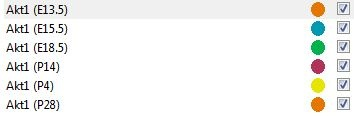
The Image Viewer will display the gene expression representations in 3-D for your gene of interest across all stages. Each stage will default to separate color schemes for each developing stage. For each developing stage, a sphere represents expression re-sampled to a grid resolution that is dependent on the stage in question (see the Informatics Data Processing whitepaper available in the Documentation. Larger spheres correspond to a greater density of expression in that voxel.
You can filter the developmental stages by hovering your mouse over the age to bring up an “X” or a magnifying glass. Clicking on the “X” will close that experiment, clicking on the magnifying glass will remove all the other stages from the viewer.
You can select a sphere by clicking on it. Spheres can be deselected by clicking on blank space. The original ISH image of the selected sphere will be displayed blended with the expression heat mask in the lower left-hand portion of the screen. The blending can be adjusted by selecting Image Controls from the View menu and moving the Image Blending slider. Clicking on the arrow in the top right-hand corner of the zoomed ISH image will open the corresponding ISH image in a high resolution image viewer.
The information at the upper-left corner of the main Brain Explorer window summarizes the expression detected in the selected grid location. These numbers include the average expression density and intensity (over pixels). The Informatics Data Processing White Paper describes how the measurements were obtained.
To change the gene expression representation, click on the “Data” menu and select an option under “Raw” colors.
A compass in the right-hand corner of the Image Viewer can be used to rotate the brain(s) by clicking and dragging your cursor. You can zoom using either the wheel on your mouse or using the Zoom scrollbar in the lower right-hand corner of the Image Viewer.
Expression Thresholds
A way to control expression visibility is by setting thresholds on expression values. This method can restrict visible spheres to different combinations such as low intensity and low density or high intensity and low density.
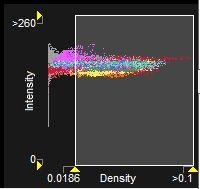
The graph in the lower right-hand corner shows a dot for each data point (sphere) in a gene expression file, and the color of the dot corresponds to the anatomic annotation in the same way the atlas colors display mode works. Each data point is plotted according to its density on the x-axis and its intensity on the y-axis.
The color scale on the left-hand side of the graph corresponds to the expression level heat map used to color the spheres, color coded to the reference atlas structures. The numbers along each axis show the values at the yellow triangles.
The thresholds can be changed by resizing the white box. Any edge or corner of the box can be clicked and dragged to re-size it. You can also click and drag in the center of the box to move the box.
Structure Ontology Viewer
The Structure Ontology Viewer shows the entire collapsible ontology for the developing mouse brain as defined by the Allen Developing Mouse Reference Atlas. The first column represents the color of the reference atlas for that structure. The two columns to the right determine the type of data displayed in the Image Viewer. “A” represents atlas structure and when checked, will show a visual representation of that structure in the Image Viewer. “D” represents gene expression and when checked, will show gene expression in that structural domain.
The default organization for the Structure Ontology is the Hierarchical View, but if you are unfamiliar with the ontology, you can click on the Alphabetical View to see the structure list in alphabetical order.
The Bookmarks tab is a space where you can create and save favorite views of the brain. Several default views are already saved that will rotate the brain back into common viewing frames.
Gene List
This section displays the experiments you have selected and downloaded in this session. Right clicking on the gene name will bring up a menu where you can, 1) view the gene detail page (Get Info), 2) be taken to a zoomed in image from this experiment (View Images), 3) copy meta information to the clipboard, such as symbol, name, Entrez ID, image-series ID (Copy Info), 4) activate a Correlation search by finding experiments with similar expression profiles (Find Similar) or 5) close the experiment and remove it from the list and the 3-D view (Close).
Gene Search
To search for genes within the Brain Explorer application, go to the Search box located above the ontology panel and type in the gene symbol or part of a gene name.
The list of results shows gene name, gene symbol along with a 3-D summary thumbnail of the expression for each experiment matching the search. The expression thumbnail represents a maximum expression projection rendering: the denser the expression in a region the more “solid” the appearance. Reference atlas colors are additionally layered on top.
To load an experiment for viewing, click on the “Download” button under the gene name.
Toolbar
Button
Operation
Selects cursor rotation tool mode
Selects cursor pan tool mode
Selects cursor selection tool mode
Toggle Sagittal Atlas section viewing
Toggle Coronal Atlas section viewing
Toggle Horizontal Atlas section viewing
Centers the Viewer on the current pinpointed expression data point
Turns on the cutting planes
Toggles the Structure Ontology and Gene List View
Advanced Features
Atlas Menu:
You can show opaque three dimensional structures of the brain by “showing” or “hiding” structures from this menu. The “Transparent” function allows you to see transparent views of the structures to view the anatomical relationships between them.
Selecting the sagittal, coronal or horizontal sections (or clicking on one of the section image buttons in the toolbar) will superimpose a single plane of the reference images (Nissl or Feulgen-HP) from each brain on your image space. These planes can be moved once the selection tool mode button in the toolbar is selected. Selecting “Show Annotation on Section” from this menu will color the reference images according to the brain structure ontology.
Data Menu:
When you have a gene selected, the Data menu allows you to show all expression, hide all expression (for instance to then select a single structure) or toggle expression (for instance, unselect your region of interest then toggle to see expression in only that region).
You can also show or remove threshold controls and choose the visual representation of your data from this menu. There are several options under “Raw” colors:
User defined: Each experiment is rendered in user specified color. This mode is useful to distinguish between individual experiments when multiple experiments are being displayed.
Atlas: In this mode the sphere is colored by the corresponding reference atlas structure color. This mode is useful for quickly seeing the annotated regions where a gene is expressing.
Signal Level: This mode displays average expression intensity and is useful for identifying areas of very high expression.
Jet: Applies the common “jet” colormap to the data.
To be taken to the experimental detail page, select “Get Info”. To see a high resolution image view of this experiment, choose “View Images”. These functions are also available by right-clicking on the gene name in the Gene List.
Choose “Find Similar” to find similar genes to the selected experiment. This uses the same Correlation Search functionality as in the web application.
Clipping Planes:
When this function is selected, either by toggling the cutting tools button in the toolbar or selecting “Clipping Planes” from the View drop down menu, you can make coronal, sagittal or horizontal cuts in your view of the brain and related data. To cut in a particular plane, make sure the cursor is in selection tool mode, and then click and drag on the plane you are interested in clipping.
Troubleshooting
Windows
Graphics
If you are using a desktop computer, you should obtain drivers from the video card manufacturer. First, identify the video card. Go the Start menu and open the Control Panel. Open the Display control panel and go to the Settings tab. Click the Advanced button and go to the Adapter tab. Your video card vendor and model name will be displayed at the top of the window under Adapter Type. Please go to the manufacturer’s web site, locate the driver download, and follow the instructions on the website or included with the downloaded file.
If you are using a laptop computer, you will need to go to your laptop manufacturer’s web site to locate the latest video drivers.
You can also activate an alternate drawing mode in Brain Explorer. Go to the View menu and select Options. Check the Draw faster but at lower quality button and uncheck the Synchronize drawing with the monitor’s vertical refresh button. Set the Multisample setting to Off.
If you are using multiple video cards from different vendors, the 3-D display may not work correctly on all attached monitors.
Uninstalling
Use the Add/Remove Programs control panel or the uninstall link in the Brain Explorer folder in the Start menu. Additional data that are not automatically uninstalled are located at the following locations:
Windows XP
Atlas data: C:\Documents and Settings\userid\Local Settings\Application Data\Allen Institute\Brain Explorer 2 User settings: C:\Documents and Settings\userid\Application Data\Allen Institute\Brain Explorer 2
Windows Vista and Windows 7
Atlas data: C:\Users\userid\AppData\Local\Allen Institute\Brain Explorer 2 User settings: C:\Users\userid\AppData\Roaming\Allen Institute\Brain Explorer 2
Proxy Settings
If you use a proxy server, the Brain Explorer application will use the proxy settings from the Internet Options control panel in the Windows Start menu. Please refer to the Windows documentation for help on proxy settings.
Mac
Uninstalling
Drag the Brain Explorer 2 icon to the trash. The Brain Explorer application generates the following files, which can also be dragged to the trash.
If the Brain Explorer application is not running smoothly, first try to free up as much memory as possible by quitting all other open applications. You can also activate an alternate drawing mode. Go to the Brain Explorer 2 menu and select Preferences. Check the Draw faster but at lower quality button and uncheck the Synchronize drawing with the monitor’s vertical refresh button. Set Multisampling to Off.
Learn about API For Allen Developing Mouse Brain Atlas with comprehensive guides and examples from Allen Institute for Brain Science.
The Allen Developing Mouse Brain Atlas provides in situ hybridization (ISH) image data for approximately 2,000 genes over embryonic and postnatal timepoints. Each data set is processed through an informatics analysis pipeline to obtain spatially mapped quantified expression information.
From the API, you can:
Download images
Download quantified expression values by structure
Download quantified expression values as 3-D grids
Query the correlative search service
Query the image synchronization service
Download atlas images, drawings and structure ontology
This document provides a brief overview of the data, database organization and example queries. API database object names are in camel case. See the main API documentation for more information on data models and query syntax.
Experimental Overview and Metadata
Experimental data from this atlas is associated with the “Developing Mouse Brain” Product.
Multiple genes were assayed using each Specimen. Typically, the sectioning scheme divided each brain into 4 to 8 interleaving SectionDataSets depending on the age of the specimen.
Section thickness is 20 micron for the earlier timepoints up to P4 and 25 micron for P14 and older. Section thickness is an attribute of the SectionDataSet object.
Image resolution is variable (0.99 - 1.049 microns) and is reported as an attribute of SectionImage.
Each gene was assayed with one sagittal SectionDataSet at each of the 7 main developmental timepoints (E11.5, E13.5, E15.5, E18.5, P4, P14, P28). A subset of genes also has coronal SectionDataSets, replicate sagittal experiments and/or data for intermediate and aging timepoints.
To support the generation of structure/age summaries for the web application, one sagittal SectionDataSet is selected as the representative for each age. This is reported as the boolean delegate attribute of SectionDataSet.
From the API, detailed information about Genes, Probes, SectionDataSets and SectionImages can be obtained using RMA queries.
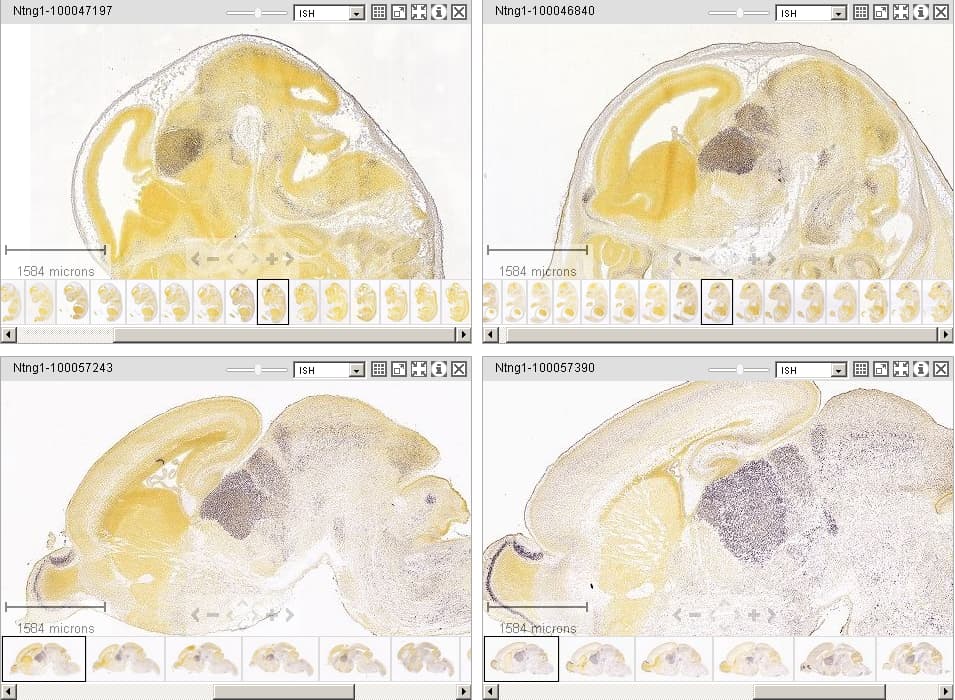
Figure: There are 11 SectionDataSets associated with gene netrin G1 (Ntng1). Screenshot shows SectionDataSets for timepoints E13.5, E15.5, E18.5 and P4.
See the image download page to learn how to download images at different resolutions and regions of interest.
Informatics Data Processing
The informatics data processing pipeline produces results that enable the navigation, analysis and visualization. The pipeline consists of the following components:
a set of age-matched annotated 3-D reference spaces,
an alignment module,
an expression detection module,
an expression gridding module, and
a structure unionizer module.
The output of the pipeline is quantified expression values at a grid voxel level and at a structure level according to the integrated reference atlas ontology. The grid level data are used downstream to provide a correlative gene search service and to support visualization of spatial relationships. See the informatics processing whitepaper for more details.
3-D Reference Models
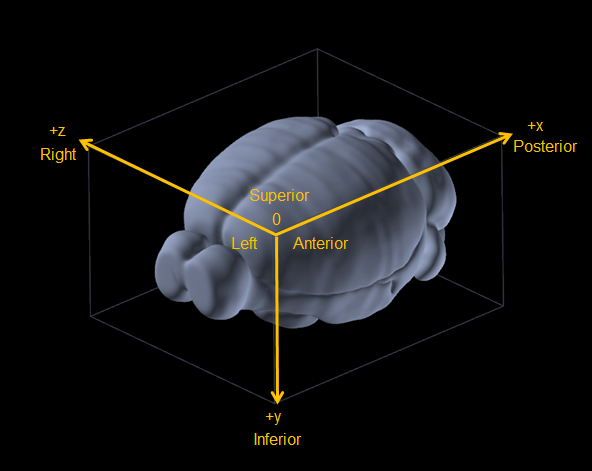
The backbone of the automated pipeline is a set of annotated 3-D reference spaces for each of the 7 developmental stages. For each stage, a brain volume was reconstructed from section images from a single specimen. Each 3-D reference space is in PIR orientation (+x = posterior, +y = inferior, +z = right).
Figure: All references spaces are in PIR orientation where x axis = Anterior-to-Posterior, y axis = Superior-to-Inferior and z axis = Left-to-Right.
Structural delineation were extracted from the associated 2-D reference atlas plates and interpolated to create 3-D annotations. Structures in the reference atlas are arranged in a hierarchical organization. Each structure has one parent and denotes a “part-of” relationship. Structures are assigned a color to visually emphasize their hierarchical positions in the brain. Note: the structural hierarchy used in this atlas is based on a systematic developmental ontology that differs from the ontology used for processing the Allen Mouse Brain Atlas.
Three volumetric data files are available for download for each reference space from our download server:
atlasVolume: uchar (8bit) grayscale Nissl or Feulgen-HP yellow volume of the reconstructed brain.
annotation: uint (32bit) structural annotation volume matching the atlasVolume. The value represents the ID of the finest level structure annotated for the voxel. Note: the 3-D mask for any structure is composed of all voxels annotated for that structure and all of its descendents in the structure hierarchy.
gridAnnotation: uint (32bit) structural annotation volume at grid resolution.
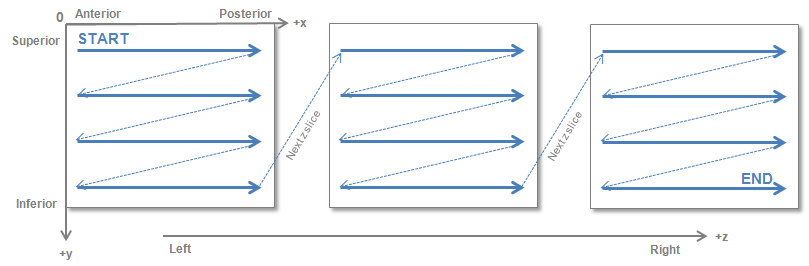
All volumetric data is stored in an uncompressed format with a simple text header file in MetaImage format. The raw numerical data is stored as a 1-D array as shown in the figure below.
Figure: Packing of 3-D volumetric data into a 1-D numerical array.
The atlas volumedimension and resolution for each ReferenceSpace vary with age, scanning platform and gene sampling density as listed in the table below.
Example Matlab code snippet to read in the P4 atlas and annotation volume:
% ------------
% Download and unzip the P4(ReferenceSpace=6) atlasVolume and annotation zip files
% ------------
% atlas volume size
size = [724,403,398];
% VOL = 3-D matrix of atlas Nissl volume
fid = fopen('P4_atlasVolume/atlasVolume.raw', 'r', 'l' );
VOL = fread( fid, prod(size), 'uint8' );
fclose( fid );
VOL = reshape(VOL,size);
% ANO = 3-D matrix of annotation labels
fid = fopen('P4_DevMouse2012_annotation/annotation.raw', 'r', 'l' );
ANO = fread( fid, prod(size), 'uint32' );
fclose( fid );
ANO = reshape(ANO,size);
% Display one coronal section
figure;imagesc(squeeze(VOL(362,:,:)));colormap(gray);
figure;imagesc(squeeze(ANO(362,:,:)));colormap(lines);
% Display one sagittal section
figure;imagesc(squeeze(ANO(:,:,115)));colormap(lines);
figure;imagesc(squeeze(VOL(:,:,115)));colormap(gray);
Example Matlab code snippet to read in the P4 grid annotation volume:
% -----------% Download and unzip the P4 (ReferenceSpace=6) gridAnnotation zip files
% -----------% grid volume size
sizeGrid = [77,43,50];
% ANOGD = 3-D matrix of grid-level annotation labels
fid = fopen( 'P4_DevMouse2012_gridAnnotation/gridAnnotation.raw', 'r', 'l' );
ANOGD = fread( fid, prod(sizeGrid), 'uint32' );
fclose( fid );
ANOGD = reshape(ANOGD,sizeGrid);
% Display one coronal and one sagittal section
figure;imagesc(squeeze(ANOGD(36,:,:)));colormap(lines);
figure;imagesc(squeeze(ANOGD(:,:,14)));colormap(lines);
Image Alignment
The aim of image alignment is to establish a mapping from each SectionDataSet to its exact or closest age matched ReferenceSpace. The reference-space-id attribute indicates which reference space the data has been aligned to. The module reconstructs a 3-D Specimen volume from its constituent SectionImages and registers the volume to the 3-D reference model by maximizing image correlation.
Once registration is achieved, information from the 3-D reference model can be transferred to the reconstructed Specimen and vice versa. The resulting transform information is stored in the database. Each SectionImage has an Alignment2d object that represents the 2-D affine transform between an image pixel position and a location in the Specimen volume. Each SectionDataSet has an Alignment3d object that represents the 3-D affine transform between a location in the Specimen volume and a point in the 3-D reference model. Spatial correspondence between any two SectionDataSets from different Specimens can be established by composing these transforms.
For convenience, a set of “Image Synchronization” API methods is available to find a corresponding position between SectionDataSets, the 3-D reference model and structures. Note that all locations on SectionImages are reported in pixel coordinates and all locations in 3-D ReferenceSpaces are reported in microns. These methods are used by the Web application to provide the image synchronization feature in the multiple image viewer.
To support image synchronization across reference spaces, each space has been co-registered and scaled to every other space using a 12 parameter affine transform, allowing brains of different ages to be roughly compared. The image synchronization API methods automatically perform the cross-space transform when requesting to sync data from different reference spaces.
[type or paste code here](http://api.brain-map.org/api/v2/image_to_atlas/101121829.json?x=5752&y=3312&atlas_id=181276165)
Figure: Cross timepoint image synchronization on the Web application. Multiple SectionDataSets in the Zoom-and-Pan (Zap) viewer can be synchronized to the same approximate location across different ages. Screenshot taken after synchronization of 5 other Ntng1 SectionDataSets at E13.5, E15.5, E18.5, P14 and P28 to the P4 (lower-left) SectionDataSet.
Figure: Screenshot taken after synchronization of the E11.5, E13.5, E15.5, P4, P14 and P56 atlases to the P4 ISH SectionDataSet (lower-left in the previous figure).
Expression Detection
For every ISH SectionImage, a grayscale mask is generated that identifies pixels corresponding to gene expression. The detection algorithm is based on adaptive thresholding and mathematical morphology.
The expression mask image is the same size and pixel resolution as the primary ISH image and can be downloaded through the image download service.
Expression Gridding
For each SectionDataSet, the Gridding module creates a low resolution 3-D summary of the gene expression and projects the data to its exact or closest age matched ReferenceSpace. Casting all data into a canonical space allows for easy cross-comparison of gene expression data within each stage. The expression data grids can also be viewed directly as 3-D volumes or used for analysis such as correlative searches.
Each image in a SectionDataSet is divided into a grid resolution squares. Grid resolution varies with age ranging from 80 x 80 µm at E11.5 to 200 x 200 µm at P28. Pixel-based gene expression statistics are computed using information from the primary ISH and the expression mask:
expression density = sum of expressing pixels / sum of all pixels in division
expression intensity = sum of expressing pixel intensity / sum of expressing pixels
expression energy = expression intensity * expression density
Each per-image 2-D expression grid is smoothed and rotated to form a 3-D grid. Z-direction smoothing is applied to the 3-D grid which is then transformed into the targeted reference space.
Grid data can be downloaded for each SectionDataSet using the 3-D Expression Grid Data Service. The service returns a zip file containing the volumetric data for expression density, intensity and/or energy in an uncompressed format with a simple text header file in MetaImage format. Structural annotation for each grid voxel can be obtained via the ReferenceSpace gridAnnotation volume file.
Note: Coronal SectionDataSets span both hemispheres while sagittal SectionDataSets only span the left hemisphere. Voxels with no data are assigned a value of “-1”.
The expression data grid can be viewed in the Brain Explorer® 2 desktop program. Each grid voxel is rendered as a colorized sphere where the diameter represents expression energy and the color encodes expression intensity. In addition, a preview of the expression data grid is shown on the Web application as a series of maximum density projection images.
Example Matlab code snippet to read an energy grid volume:
%------------% Download and unzip the energy grid file for P4 Rora Pdyn SectionDataSet
%-----------% grid volume size
sizeGrid = [77,43,50];
% ENERGY =3-D matrix of expression energy grid volume
fid = fopen('Rora_P4_sagittal_100054927/energy.raw', 'r', 'l' );
ENERGY = fread( fid, prod(sizeGrid), 'float' );
fclose( fid );
ENERGY = reshape(ENERGY,sizeGrid);
% Display one coronal andone sagittal section
figure;imagesc(squeeze(ENERGY(36,:,:)));colormap(gray);
figure;imagesc(squeeze(ENERGY(:,:,14)));colormap(gray);
Structure Unionization
Expression statistics at a structural level are also computed by combining/unionizing grid voxels with the same 3-D structural label. Expression statistics are encapsulated as a StructureUnionize object associated with one Structure and one SectionDataSet. StructureUnionize data is used in the web application to display expression summary colormaps for a set of coarse structures over development.
Expression statistics are encapsulated as a StructureUnionize object associated with one Structure and one SectionDataSet and can be downloaded via RMA.
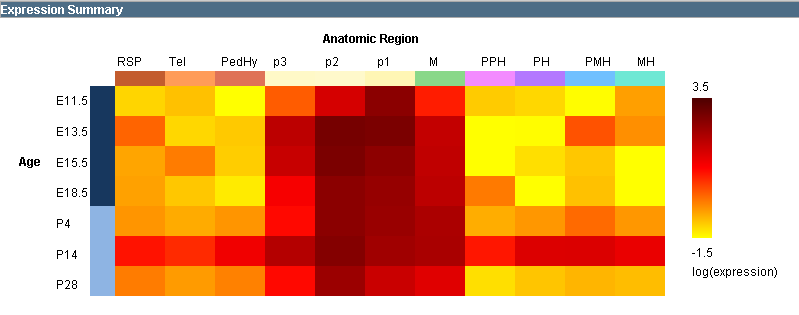
StructureUnionize data is used in the web application to generate an expression summary heatmap for a set of coarse structures over the 7 main developmental timepoints assayed.
Example:
Fetch expression energy values for the delegate SectionDataSet at each of the 7 developmental ages for coarse-level structures RSP, Tel, PedHy, p3, p2, p1, M, PPH, PH, PMH and MH in CSV format
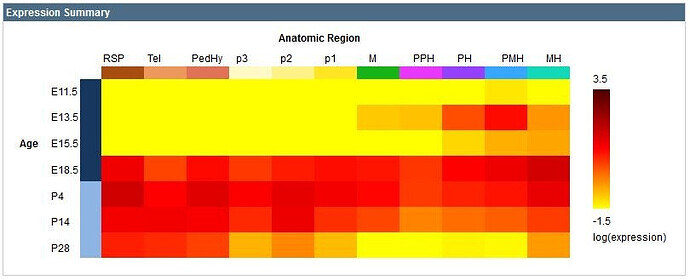
Figure: Gene expression “heatmap” from the gene detail page of Tcf7l2 for 11 gross anatomical regions over 7 developmental timepoints.
Expression Grid Search Service
A expression grid service has been implemented to allow users to instantly perform a correlation search over the ~2,000 genes to find genes that have a similar spatio-temporal profile to a seed gene.
The expression grid search service is available through both the Web application and API.
To perform a Correlation search, a user selects a seed Gene, a spatial domain and a set of timepoints over which the similarity comparison is to be made. All voxels belonging to any of the domain structures and specified timepoints form the domain voxel set. Pearson’s correlation coefficient is computed between the domain voxel set from the seed Gene and every other Gene in the Product. The return list is sorted by descending correlation coefficient.
Note: Only the 7 main developmental timepoints (E11.5, E13.5, E15.5, E18.5, P4, P14, P28) can be used as temporal domain. For each timepoint, the delegate SectionDataSet is used in the computation.
See the connected service page for definitions of service::dev_mouse_correlation parameters.
Example:
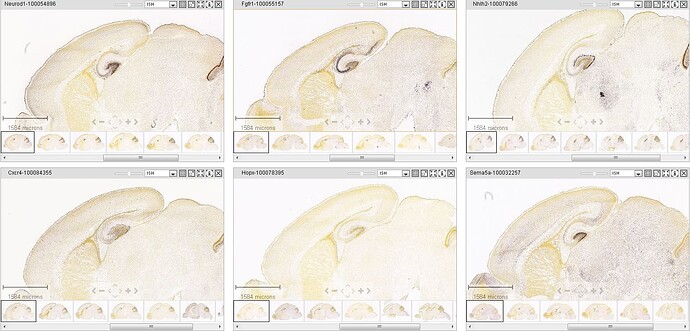
Correlation search for genes with similar expression to Neurod1 within the telencephalic vesicle (Tel) at age P4
Figure: Screenshot of top returns of a correlation search for genes with similar expression as Neurod1 within the telencephalic telencephalic vesicle at age P4.
Example:
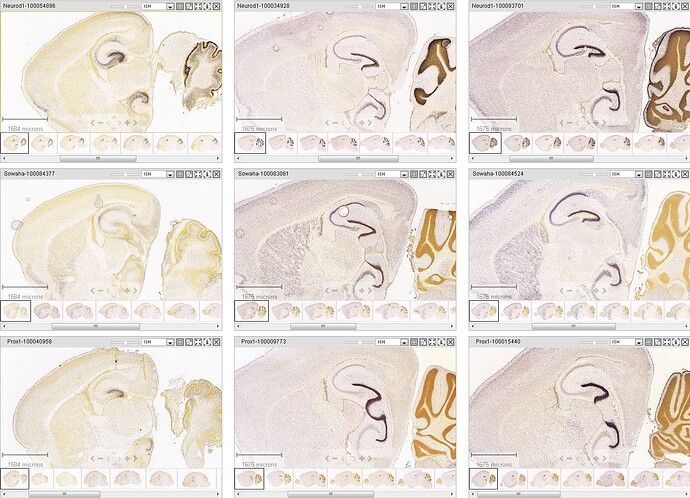
Correlation search for genes with similar expression to Neurod1 within Tel over multiple ages P4, P14, P28
Figure: Screenshot of the top 2 returns (Sowaha, Prox1) of a correlation search for genes with similar expression as Neurod1 within the telencephalic vesicle at ages (left to right) P4, P14, P28.
Example:
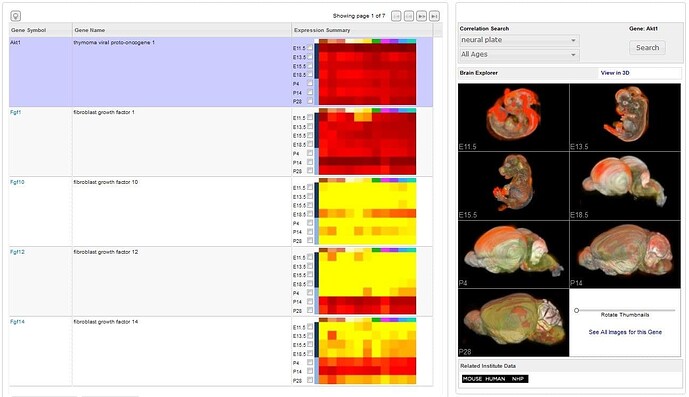
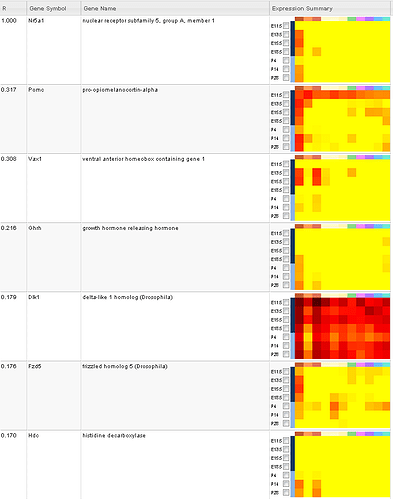
Correlation search for genes with similar expression to Nr5a1 over the whole neural plate (NP) and across all 7 ages
Figure: Screenshot of the top returns of a correlation search for genes with similar expression as Nr5a1 over the whole neural plate (NP) and across all 7 ages. Each gene is represented by an expression “heatmap” for 11 gross regions.
Expert Manual Annotation
ISH data for ages E11.5, E13.5, E15.5 and E18.5 were manually annotated to provide accurate gene expression characteristics for fine level structures. For each SectionDataSet and Structure, gene expression is scored with intensity (Undetected, Low, Medium, High), density (Undetected, Low, Medium, High) and pattern (Undetected, Full, Regional, Gradient) attributes.
Manual annotation results can be accessed through RMA and can be used to search data.
Note: the structural hierarchy associated with the manual annotation differs from the Ontology used for informatics processing of the ISH data.
Examples:
Download manual annotation for gene Tcf7l2 at E11.5
Allen Developing Mouse Brain Atlas In Situ Hybridization ISH Data
Learn about Allen Developing Mouse Brain Atlas In Situ Hybridization ISH Data with comprehensive guides and examples from Allen Institute for Brain Science.
Viewing Gene Expression Data
The Allen Developing Mouse Brain Atlas offers colorimetric In Situ Hybridization data at cellular resolution at seven stages of mouse development. Choose among the following options for retrieving the data:
Search from the tag cloud by Gene Classification
Use Gene Search to locate genes’ data by name, symbol, NCBI accession number, or Entrez Gene ID.
You can also use Gene Search with Boolean operators on specific field names using Boolean Syntax Query.
Search for manually curated enhanced gene expression data using the Annotation Search.
Search for genes with enhanced expression by anatomic region using Anatomic Search.
Search for genes with enhanced expression by developmental stage using Temporal Search.
Explore related studies using the Extended Studies radio button.
Gene Search
To search for a specific gene by name, symbol, NCBI accession number, or Entrez gene ID, type your query into the text box, making sure the “Gene Search” radio button is selected. As you type, genes that match your search string will be suggested to you. Select an item from the list and click the “Search” button. The results are displayed in a list that shows all genes with expression data that match your query.
Tips for searching:
If you are unsure of spelling, begin typing the gene identifier and suggestions will be offered.
Press the ‘Enter’ key instead of clicking the “Search” button.
Select the “Show exact matches only” check box to remove the implied wildcards. This is useful if you want to return only those genes that exactly match your search text.
Place the search text within quotes to include spaces or special characters.
When searching for more than one gene, separate each search term by a comma.
Boolean Syntax Query
The following special operators can be used to build queries:
Operator
Example Search Type
Example Query
AND
Gene
dopamine AND receptor
OR
Gene
ABAT OR AChE
NOT
Gene
“dopamine receptor” NOT DRD3
The AND function is implicit, so spaces between words that are not separated by an operator will be treated like AND.
OR has higher operator precedence than AND.
Parentheses can be used to group criteria, but nested parentheses are not supported at this time.
Annotation Search
While our automatically-generated semi-quantitative analysis tools (Anatomic Search and Temporal Search) provide an informative global view of gene expression in the developing brain, these tools provide gene expression information primarily about larger brain regions, with limited resolution for precise brain areas. The Annotation Search feature utilizes expert-guided manual annotation performed by Dr. Salvador Martinez of the Neurosciences Institute, Miguel Hernandez University and CSIC in Alicante, Spain.
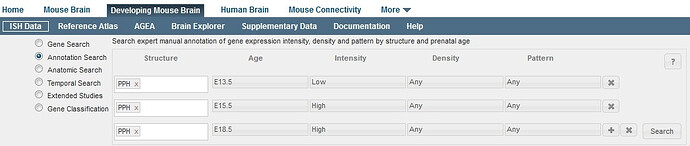
This feature allows you to search the annotation data for all genes that match specific gene expression criteria. Start by selecting a structure from the developing mouse ontology and then indicate the age(s), the expression intensity(ies), the expression density(ies) and the expression pattern(s). To understand the criteria used to make these manual annotations, please see the Annotation whitepaper in the Documentation tab.
To look for genes that also match additional criteria, click the “+” button to add another row to your search. Remove extra rows by clicking the “x” box. Once you have entered your search criteria, click on the “Search” button. The results are displayed as a list of genes demonstrating gene expression patterns that match your query.
Any genes that meet the criteria in ALL rows of the search will be returned. If two or more specific ages (or intensities, densities or patterns) are selected in a single row, the search will find all results that match any one of the criteria (i.e. an “OR” search).
For example, this query displayed above will return many results because the second line specifies that either the E15.5 or E18.5 timepoints can have high expression in the prepontine hindbrain. The query displayed below looks similar but it is much more selective; only a few genes have high expression in PPH for E15.5 AND E18.5, AND Low expression in E13.5.
Viewing Annotation Search Results
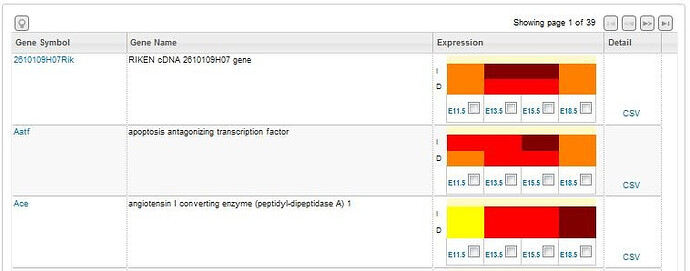
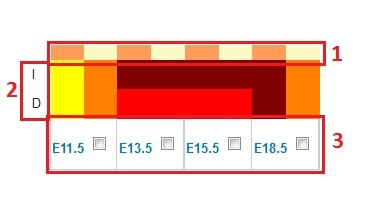
Search returns include a list of experiments that fulfill your search criteria listing the gene symbol, the gene name, an expression summary illustrated in a heatmap format and a link to the .csv annotation document for that gene. The expression summary will include:
Structures - The structures you selected colored according to the reference atlas colors as column headers in the heatmap.
Annotation Results - Row headers are the Intensity (I) and the Density (D) and colored as follows: Grey - Cannot Annotate, Yellow - Undetected, Orange - Low, Red - Medium, Burgundy - High.
Stages for each experiment - Click on the check boxes to view image series in a separate window.
Anatomic Search
Select the “Anatomic Search” radio button to search for genes that are predominantly enriched within the selected brain structure. Results will be returned for the specified age. Experiments are ranked by the specificity of the gene in the brain structure of interest as opposed to adjacent brain regions. The rank is defined as the ratio of sum of expressing pixel intensities in the numerator set (target region) over the sum of expressing pixel intensities in the denominator set (a defined set of non-overlapping structures, see Data Processing Whitepaper under the Documentation tab). Thirteen structures are generally available for search for each age, with the exception of E11.5, for which five structures are available. The results are provided as a list of experiments for the given age and search query.
Please refer to the Informatics Data Processing white paper in the Documentation tab for additional details.
Temporal Search
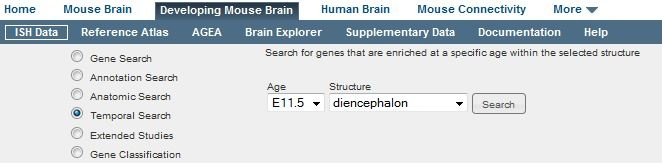
Select the “Temporal Search” radio button to search for genes that are enriched at a specific age within the selected structure. Note that this feature does not search for spatial enrichment; Anatomic Search should be used for that purpose. This search feature compares gene expression in the given structure at the given age and compares it to expression in the same structure at 7 other time points. Results are returned as a list of experiments ranked by their temporal enrichment in descending order, with the most temporally enriched genes first.
Please refer to the Informatics Data Processing white paper in the Documentation tab for additional details.
Correlation Search
Once you have found a gene of interest, you can also find genes with a similar expression profile to your gene of interest using the Correlation Search option: once a gene is selected by clicking on the gene name, from the right-hand panel, choose one or more structures from the structure drop-down menu and one or more ages from the ages drop-down menu and then click “Search”. Your search will result in a list of genes with a similar expression pattern to your search criteria.
Extended Studies
A select group of genes were sampled deeper and can be viewed using the Extended Studies radio button.
High Temporal Sampling Study
Select “High Temporal Sampling Study” to see ~20 developmental marker genes characterized by ISH in coronal plane with higher temporal resolution, including 8 embryonic developmental stages and 6 early postnatal stages.
Aging Study
Select “Aging Study” to see ~300 genes surveyed in aged brain at 18 and 24 months.
Viewing Search Results
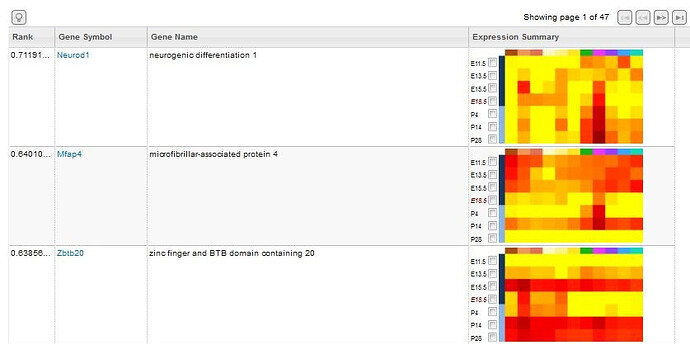
Searches will return a list of genes based on the input search criteria. Each row includes the following information.
Column
Description
Rank
Anatomic: Measure of specificity in a structure compared to its neighboring structures within a time point or Anatomic: measure of specificity in a timepoint compared to the other 7 timepoints within a structure
Full gene name. Click on the gene name to seed the right hand panel with that gene
Expression Summary
Heatmap view of the expression energy across 12 major brain structures and over each of the ages
Select the experiments to view in greater detail by clicking the checkboxes next to gene and age of interest. Experiments will be saved in your cache until you select the “Clear Selections” button at the bottom of the page. After selecting one or more experiments, click the “View Selections” button.
Once you have selected a gene (by clicking on it’s Gene Name), you can view the rotating 3-D thumbnails in the right hand panel and you can look for genes with a similar expression profile.
Experiment Image Viewer
The experiment image viewer displays images for each selected experiment in a Zoom and Pan viewer. This viewer makes it easy to compare experiments with each other and with the Reference Atlas.
Multiple image series can be opened on the same page to enable side-by-side comparisons. Arrange the experiments by dragging a viewer by the title bar and dropping in a new location. Add one or more reference atlases by selecting from the “Atlases” drop-down menu in the upper-right hand corner of the window.
If you are viewing more than one experiment, open the configuration options to change the number of columns displayed in the window. The configuration options are accessible by clicking on the button with a “gear” icon to the right of the “Atlases” menu.
The gene symbol is displayed in the title bar along with the Allen Institute image series ID. Additional details are displayed across the top of the viewing area, including the image index, tissue index, and tissue location.
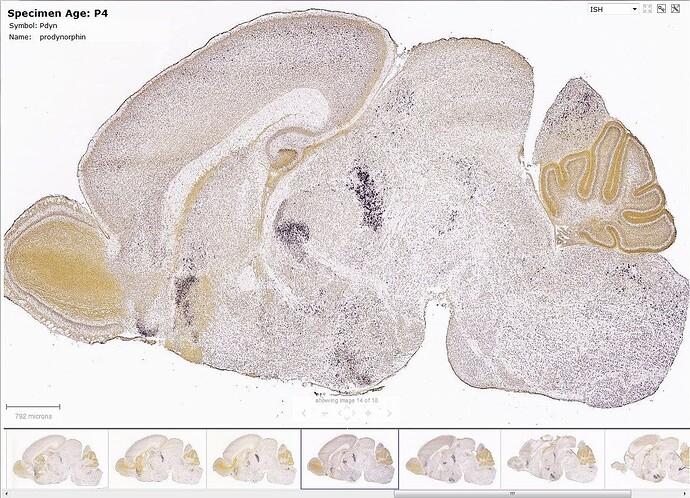
Thumbnails for the entire image series are displayed across the bottom of the viewer in section order. Click a thumbnail to select it for viewing, or use the keyboard to navigate through the set. The current selection is outlined in black.
Gene Detail
When you click on the gene symbol, you will be taken to a page that describes the experiments involving this gene in detail. The data returned includes gene detail metadata, the Expression Summary and a list of the experiments performed.
Gene detail metadata includes the name of the gene, any aliases this gene may have, the organism that the experiment was conducted on, the Entre ID and the chromosome location of the gene.
The gene expression summary is represented in heatmap format with the age of the mouse on the vertical axis and the anatomic region on the horizontal axis color-coded to the reference atlas. The heatmap illustrates increasing expression energy ranging from a log value of -1.5 in the yellow to 3.5 in the dark red.
A list of experiments conducted on this gene includes:
Column
Description
Click this box to view experiment(s) in the interactive viewing tool
Indicates both the developmental age and the Theiler Stage
Example Image
Shows a single image from the experiment
Rotating Thumbnails
Shows a 3-D image of the gene expression that can be rotated using the slider bar in the column header
3-D File
Links to open up the individual experiment in the Brain Explorer 3-D software. Clicking on the column header will open all the experiments in the Brain Explorer
Click on one or more experiments to view all the experiments in an interactive environment. This data can also be downloaded as an XML query by clicking on the “This data is also available as XML” link.
Experimental Detail
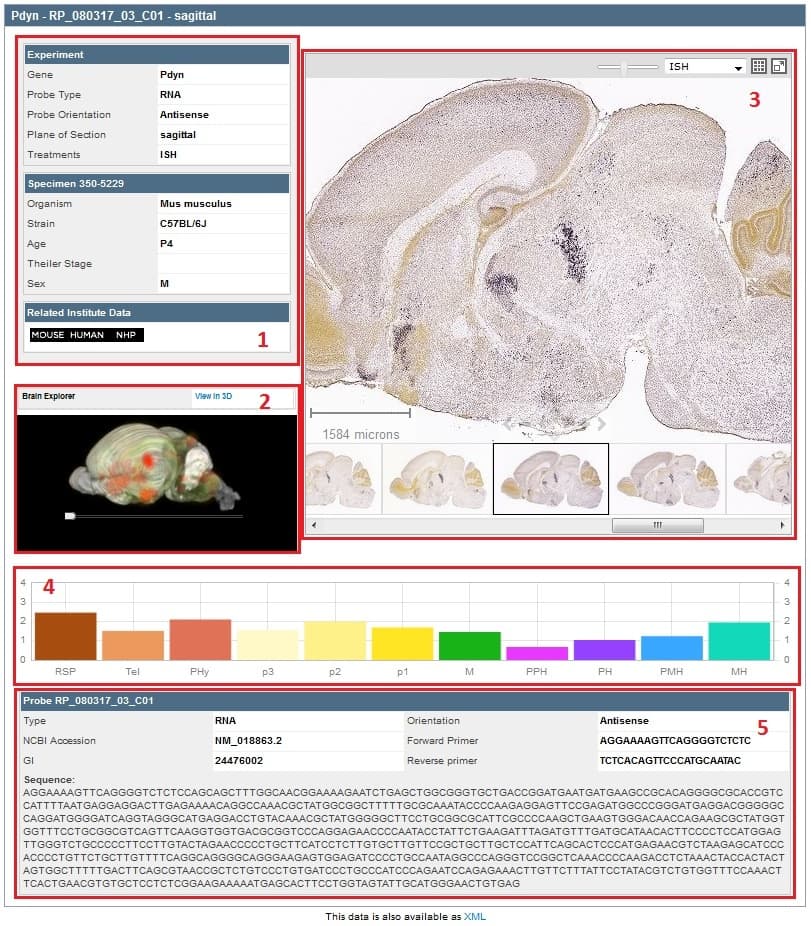
When the experiment is selected by clicking on the experimental ID link, a summary of the experimental detail is returned. The data includes 1) Experiment and Specimen metadata and a link to Related Institute Data 2) an interactive 3-dimensional representation of gene expression, 3) an interactive image viewer that displays the images in the experiment 4) a histogram of the expression energy in 11 different structures, and 5) Probe metadata including forward and reverse primers and probe sequence.
Hovering your mouse over the histogram will sync the image in the single image viewer with the section corresponding to that structure and expression.
Using the Zoom and Pan (ZAP) Image Viewer
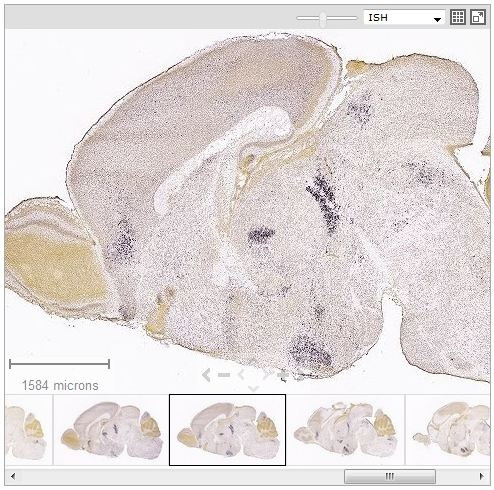
The Zoom and Pan (ZAP) Image Viewer is a powerful tool to navigate and view the images in an experiment. The main part of the viewer is an interactive window where an image can be repositioned by dragging with a mouse. Use the scroll wheel, the on screen navigation tools or the keyboard to zoom in or out.
Select other images in the experiment by clicking on a thumbnail image below the main viewer.
Scale Bar
Drag the scale bar with your mouse to the desired location. Click the text with your mouse to toggle between horizontal and vertical.
Using the ZAP Viewer Toolbar
Use the toolbar to take actions on the image that currently has focus. Toolbar controls include:
Control
Function
Move the slider bar to the left to intensify the contrast or color
Synchronize all other Zap viewers on the page that support synchronization to the currently selected image
Open a new browser window to review metadata for the image series
Close the Zap viewer
Keyboard Commands
Use the keyboard to navigate through the image series and synchronize the viewers on the page. Keyboard commands include:
Key
Function
F
Advance to the next image in the series
D
Go back to the previous image in the series
R
Advance to the last image in the series
E
Go back to the first image in the series
S
Synchronize all Zap viewers on the page that support synchronization to the currently selected image
A
Zoom in
Z
Zoom out
+
Zoom in. Please note that some keyboards may require the [Shift] key be held down while pressing the [+] key
-
Zoom out
You can also use the arrow keys to pan the current image.
Expression Energy
The expression mask image display highlights those cells that have the highest probability of gene expression using a heat map color scale (from low/blue to high/red).
The Expression Energy was calculated as follows: Within a given area A (voxel or structure), expression energy = (sum of intensity of expressing pixels in A) / (sum of all pixels in A)
Using the High Resolution Image Viewer
The image viewer enables you to view a high resolution image in its own re-sizable window. It is possible to open multiple images by opening multiple windows.
Interacting with the High Resolution Image Viewer is similar to using the ZAP Viewer with some enhanced features accessible from icons in the top right hand of the main image viewer.
Icon
Description
View ISH, Expression Energy, or Reference Stain (Nissl or Feulgen-HP Yellow)