What is the Allen Mouse Common Coordinate Framework?
Allen Mouse Brain Common Coordinate Framework (CCFv3) is a 3D reference space by creating an average brain at 10um voxel resolution from serial two-photon tomography images of 1,675 young adult C57Bl6/J mice.
Using multimodal reference data, we parcellated the entire brain directly in 3D, labeling every voxel with a brain structure spanning 43 isocortical areas and their layers, 314 subcortical gray matter structures, 81 fiber tracts, and 8 ventricular structures.
The CCF is used in our informatics pipelines and online applications to analyze, visualize and integrate multimodal and multiscale data sets in 3D, and is openly accessible for research use under our Terms of Use.
Read this paper or documentation to learn more about the creation of the CCF.
How do I view the Allen Mouse Common Coordinate Framework (CCF)?
We recommend that you download atlas volumes using the AllenSDK, a Python package containing tools for accessing and using our data. Using the AllenSDK lets you easily download and organize the atlas and template volumes. Please see the example notebook for more information.
Image registration tools to align experimental data to the CCF is an active research area. Different modalities will likely required a targeted method to solve the problem.
How do I access the registration code used in your pipeline?
The code in its current form it is highly coupled to the data modality, format and operations of the pipeline. It is likely the code will need to undergo major redevelopment for use in other contexts. For reference, the code is available on GitHub.
How do I visualize CCF annotations on the original images?
Our typical workflow for analysis and display is to align image data from different specimens all into the CCF space for integrated analyses. Using the computed deformation field, it is possible to visualized CCF annotations of interest on the original images available through the AllenSDK. This GitHub repo has code and an example notebook to demonstrate this process step by step.
How is the CCF being used by the neuroscience community?
We are keeping a list of publications and tools that uses the Allen Mouse CCF in this post. We invite others to add and contribute to the list.
Download a file manifest for all female chimpanzees from Ed Lein’s - UM1MH130981 BICAN grant
Learn to download file manifests for female chimpanzee brain data from the BICAN grant. Access primate neuroscience research datasets.
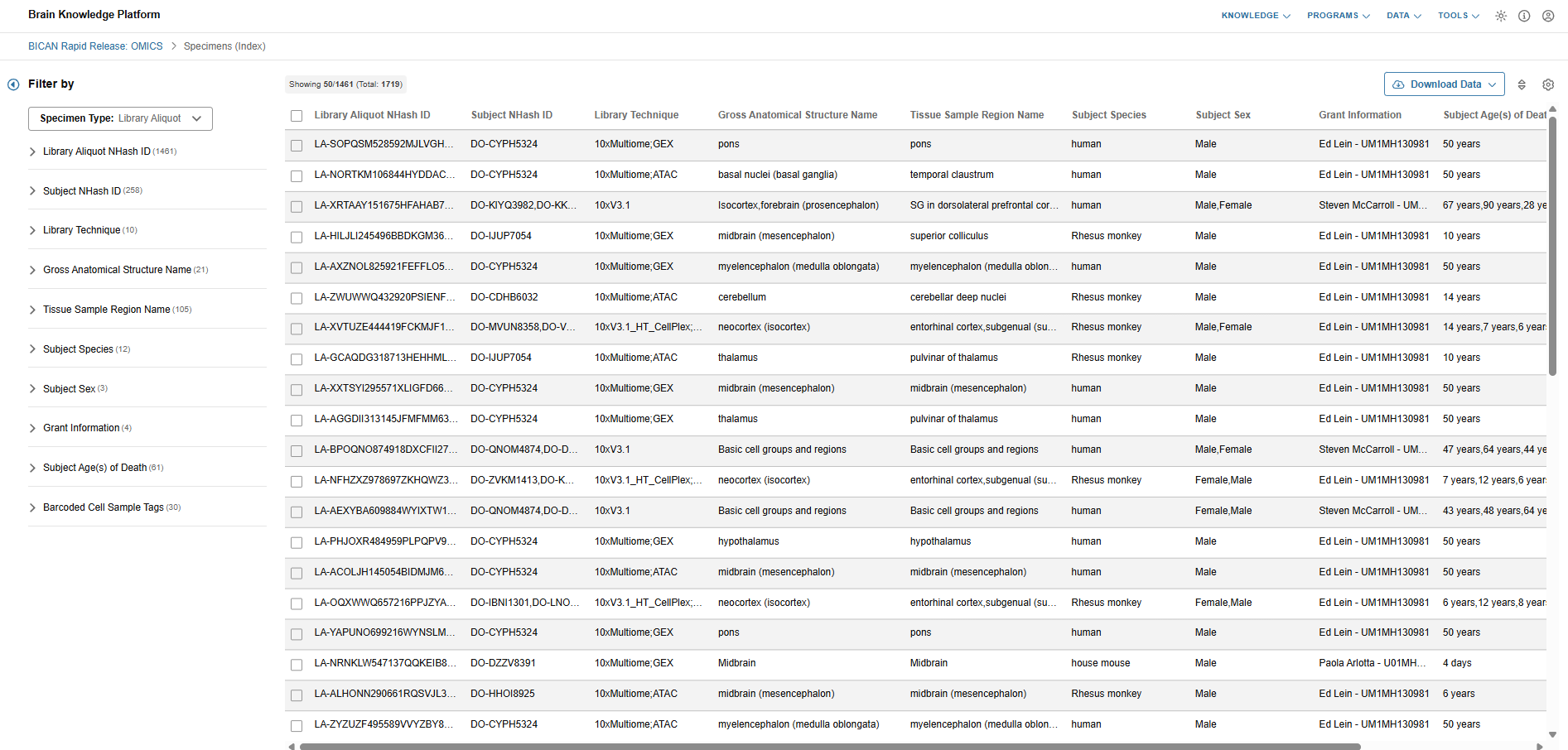
Step 1: I open the BICAN Rapid Release specimen viewer and get a general overview by scrolling around.
I review the overall BICAN specimen list and get an overview of the available library aliquots and donors.
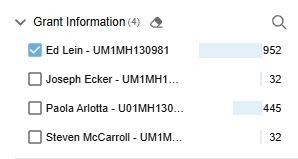
Step 2: I use filters to reduce the list to only the grant that I’m interested in.
I’m a scientist doing research on non-human primates, particularly chimpanzees, and I closely follow the efforts by the Human and Mammalian Brain Atlas (HMBA) consortium within BICAN.
I filter down to only specimens from Ed Lein’s - UM1MH130981 grant as I know they fit my focus area. I see that 952 specimens are currently available from the grant.
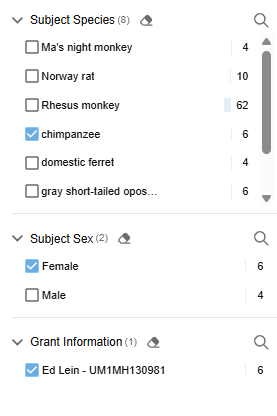
Step 3: I filter further by species & sex.
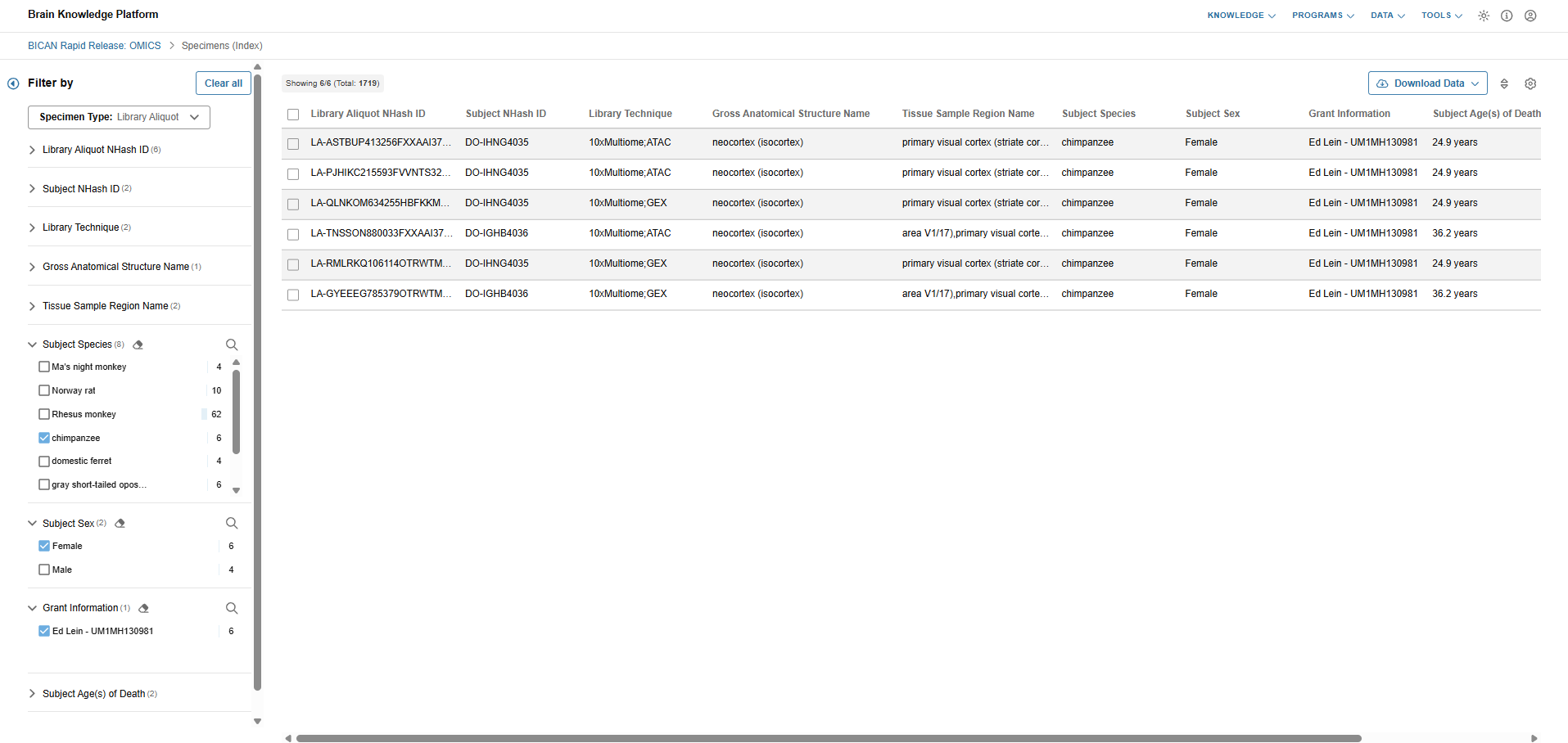
I’m looking to expand on my current data that is short on female chimpanzee specimens. I set additional filters for species = chimpanzee and sex = female. I see that 6 specimens currently match these criteria.
Step 4: I download the subset specimen metadata & file manifest and review them.
After reviewing the specimen metadata in the Data Catalog, I decide that they suitable for my purpose and download the metadata and file manifest for offline processing.
It includes 32 files for each library aliquot.
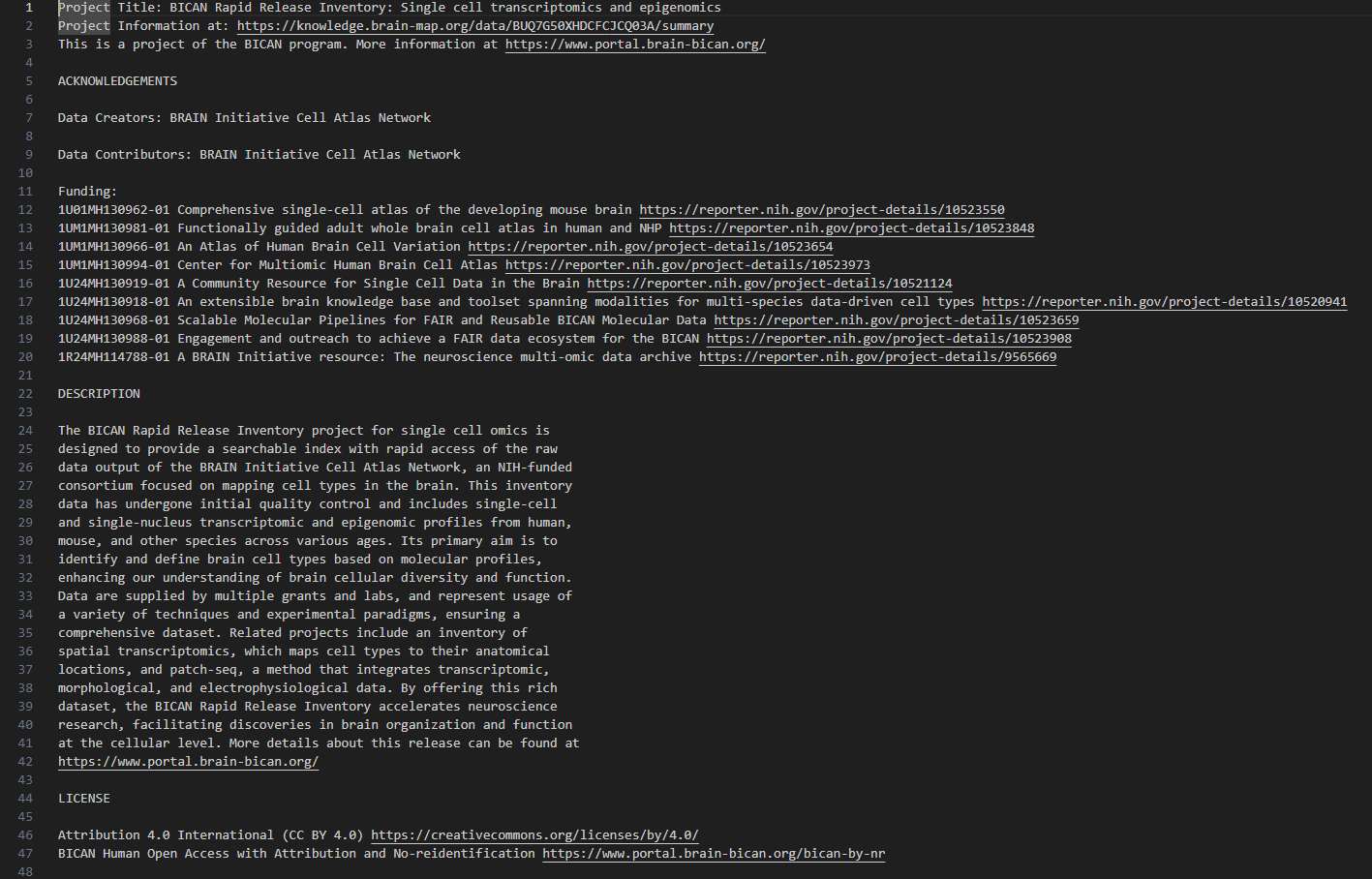
I review the documentation that comes with the file manifest and know how to access the fastq files at the archives.
Filters down to a relevant subset of specimens via the UI’s filter capabilities.
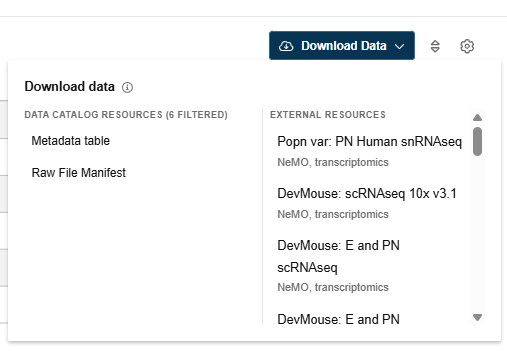
Click the download button.
Select “File Manifest” from the modal. Note: The file manifest may include both familiar HTTPS locations as well as GCP release bucket path (“gs://”). The latter are associated with restricted access data. Files referenced by these paths can be downloaded by users only after NeMO grants them access following approval from the NIMH Data Archive (NDA).
Unzip the downloaded .zip archive to access the readme and manifest.csv. The manifest output will match the filters & results of the user interface.
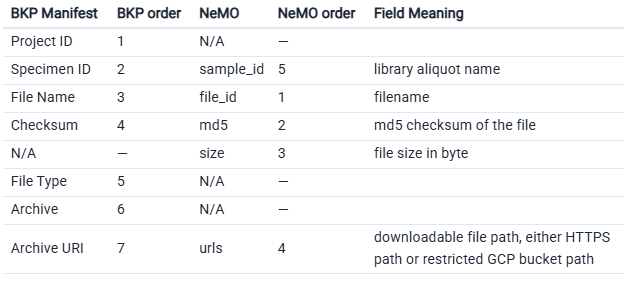
Archive tools may require adjusting the manifest’s column names and order to access data.
Note: You’ll need to manually add the size column. If there are no known values to fill, populate entries with a hyphen (“-”). Cells must not be empty.
You can then use the manifest in NeMO’s Portal-Client tool. See below for further details.
NeMO: Rapid Release Collections and Data Access
Introduction to Rapid Release Collection Types
The Rapid Release in BICAN is the immediate dissemination of high-quality, raw, and initial-processed -omics data (such as single-cell transcriptomics and epigenomics) to the public, typically within one calendar quarter (3 months) of its generation. It enables researchers to begin secondary analyses, develop new computational tools, or validate their own findings against the newest available brain cell maps.
NeMO utilizes specialized Snapshot, Cumulative, and Rapid Release collections to ensure the data released remains accessible and citable as data evolves.
Snapshot Collections (static)
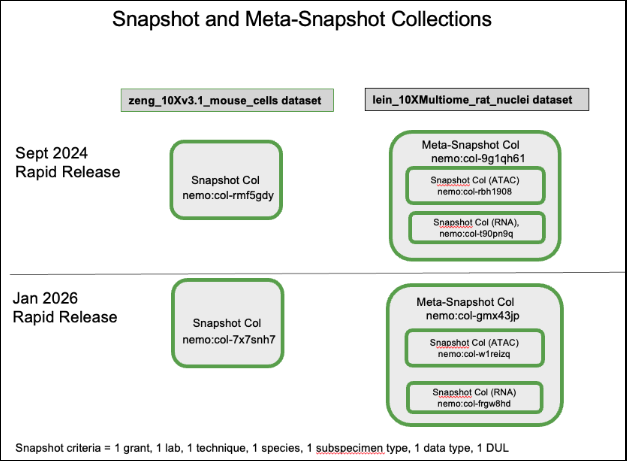
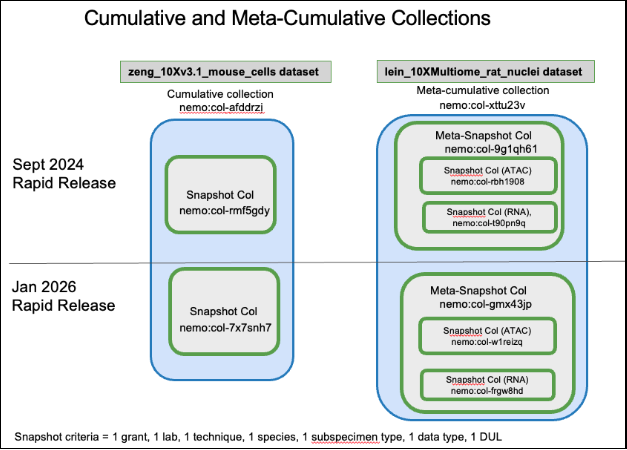
A “Snapshot” collection is the most granular immutable unit of dataset generated at a specific point in time defined by a unique combination of seven criteria: grant, lab, technique, species, subspecimen type, data type, and data use limitation (DUL). A new snapshot collection with a nemo identifier is created for files if the collection defined by the seven criteria was not part of the previous Rapid Release. Additionally, a snapshot collection is generated with a new NeMO identifier each time a Rapid Release occurs when there are new or modified files within that specific dataset. However, if no new data is included for a particular snapshot collection, the same collection identifier from the previous release is linked to the new Rapid Release. Please refer to ‘Diagram 1’ below. The files associated with these collections are packaged as BDBags for standardized data transfer. Each snapshot collection has a dedicated landing page that includes metadata associated with the data in the collection (such as taxa, modality, assay, technique, grant number, protocols, open or restricted data access etc.), a link to the BDBag, a specific data citation, and a link to the parent cumulative collection landing page. The landing page can be identified as a snapshot collection based on the collection name, which includes the prefix “BICAN__Snapshot”. The pages are hosted at assets.nemoarchive.org. To access the landing page for a specific collection in a web browser, append the NeMO identifier (‘col’ or ‘dat’ identifier) to the end of the URL, example: https://assets.nemoarchive.org/collection/nemo:col-7x7snh7.
A “Meta-Snapshot” collection is a specialized snapshot collection used to manage complex multi-modal dataset, such as Multiome datasets (e.g., RNA-seq and ATAC-seq performed on the same cells). These are “collections of snapshot collections” created at a specific point in time. A meta-snapshot collection is a parent for member snapshot collection. Please refer to ‘Diagram 1’ below. Its landing page contains a list of member snapshot collection landing page links, also including a “bag of bag” which is a parent BDBag packaged with child snapshot collection BDBags. The landing page can be identified as a meta-snapshot collection based on the collection name, which includes the prefix “BICAN__MetaSnapshot”. Example: https://assets.nemoarchive.org/collection/nemo:col-myr9nn1, is a multiome meta-snapshot collection landing page containing links to specific RNA-seq snapshot collection and an ATAC-seq snapshot collection generated for Jan, 2026 rapid release cycle. Each snapshot and meta-snapshot collection is a comprehensive aggregate, encompassing all data captured from the initial aliquot submission through the moment of collection generation.
Please refer to the section “Accessing Rapid Release Data” for downloading data associated with snapshot and meta-snapshot collections.
Diagram 1:
Cumulative Collections (dynamic)
A “Cumulative” collection acts as a stable “container” that tracks a specific dataset as it evolves across multiple releases. It represents a “collection of collections”, where the members are all the individual static snapshot collections defined by a unique combination of seven criteria produced over various Rapid Release cycles. Please refer to ‘Diagram 2’ below. Unlike snapshot collection NeMO identifiers, cumulative collection identifiers don’t change as new Rapid Releases occur. The cumulative collection landing page provides a chronological list of individual static snapshot collection landing page links. They provide a persistent entry point for researchers to find the most current version of a dataset or view its history. They don’t contain BDBag links but provide links to the HTTPS location for accessing open data or the GCP release bucket path (“gs://”) for restricted data. The pages are hosted at assets.nemoarchive.org. To access the landing page for a specific collection in a web browser, append the NeMO identifier (‘col’ or ‘dat’ identifier) to the end of the URL, example: https://assets.nemoarchive.org/nemo:col-afddrzj. The landing page can be identified as a cumulative collection based on the collection name, which includes the prefix “BICAN__Cumulative”.
A “Meta-Cumulative” collection is a specialized cumulative collection that tracks the multi-modal meta-snapshot collections across multiple releases. It tracks the evolution of the member meta-snapshot collections across various Rapid Release cycles, ensuring that researchers can always find the latest multi-modal data through a single, persistent identifier. Similar to a standard cumulative collection, the meta-cumulative identifier remains constant across releases and don’t contain BDBag links but provide direct links to the HTTPS location for accessing open data or the GCP release bucket path (“gs://”) for restricted data. Please refer to ‘Diagram 2’ below. Example:https://assets.nemoarchive.org/col-iefmnby.
Diagram 2:
Rapid Release Collection (static)
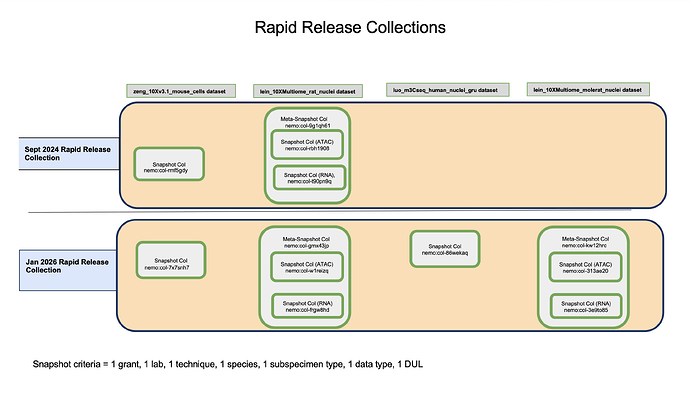
A “Rapid Release” collection represents a specific point-in-time snapshot of various datasets i.e., temporal grouping of all data released during a specific window of time. Each rapid release collection is composed of multiple unique static snapshot and meta-snapshot collections generated during that period. A new persistent rapid release NeMO identifier is generated with every rapid release. Each rapid release has a dedicated landing page including links to member snapshot collection landing pages. The landing page does not include a BDBag, nor does it provide HTTPS or GCP release bucket paths. Please refer to ‘Diagram 3’ below.
Diagram 3:
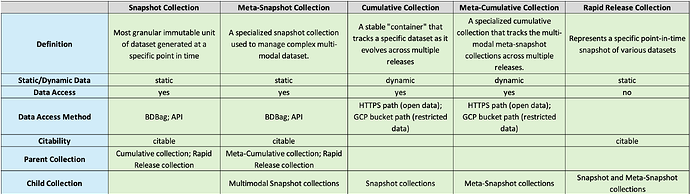
Overview of Collection Types
Data Collections available through Rapid Releases
All data collections released through the two Rapid Releases are publicly accessible. All collections from the September, 2024 Rapid Release contain open-access files available for free download. Except for two collections, all other January 2026 Rapid Release collections containing open-access data are freely available for download. The two exceptions contain restricted human fastq files, which can be accessed only upon approval from the NIMH Data Archive (NDA).
Here are the collection NeMO identifiers associated with Sept, 2024 and Jan, 2026 Rapid Releases.
Accessing Rapid Release Data
The following options are available for accessing Rapid Release data:
Landing Pages
Snapshot and Meta-snapshot collection landing pages: Snapshot and meta-snapshot collection landing pages (https://assets.nemoarchive.org/api/collection/<nemo_identifier>) provide links to downloadable BDBags (an archive file containing downloadable file paths). To retrieve files, users must install the BDBag software. Detailed instructions for installing the tool and downloading files are available in the BDBag documentation. More information is available here. Each snapshot collection links to a single BDBag that includes a file metadata manifest listing all files available for download along with their associated metadata. A key metadata field in this manifest is the “library_aliquot_nhash_id”, a unique identifier for a library aliquot generated by the NIMP. This identifier can be used to retrieve donor and specimen metadata from the Brain Knowledge Platform’s (BKP) Data Catalog Specimen table and from NIMP via their APIs.
Meta-snapshot collection (eg: multiome) landing pages provide links to a master BDBag (a “bag of bags”). This master BDBag contains individual child BDBags, one for each snapshot collection included in the meta-snapshot. Each child BDBag includes its own file metadata manifest.
Open data BDBags: The BDBags linked in collections with open data contain downloadable HTTPS file paths.
Restricted data BDBags: The BDBags linked in collections with restricted data have GCP bucket file paths (gs://). Files referenced by these paths can be downloaded by users only after NeMO grants them access following approval from the NIMH Data Archive (NDA).
Cumulative and Meta-cumulative collection landing pages:
The cumulative and meta-cumulative collection landing pages do not contain links to BDBags but contain HTTPS paths for open access data and GCP bucket path (gs://) for restricted data. Restricted files referenced by GCP bucket paths (gs://) can be downloaded by users only after NeMO grants them access following approval from the NIMH Data Archive (NDA).
Rapid release collection landing page: Files cannot be downloaded directly from this page. To access the data, users must navigate to each child snapshot collection landing page for accessing the files via a BDBag or NeMO API.
NeMO API endpoints
The NeMO API enables users to access and download data associated with grants, projects, subjects, samples (including libraries and aliquots), collections (including publications), and files. Both landing pages and API endpoints support metadata retrieval using NeMO identifiers as well as NIMP NHASH identifiers. API resources are available at https://assets.nemoarchive.org and do not require user authentication. Only publicly accessible metadata are displayed through the landing pages and APIs. Please refer to the detailed documentation on using the NeMO APIs to retrieve collection data.
Files associated with both snapshot and meta-snapshot collections can be retrieved using NeMO API endpoints. For collections containing restricted data, the file endpoints return restricted GCP bucket file paths, however, files can be downloaded only after the user has been granted access to the corresponding bucket. Please refer to the documentation describing the NIMH Data Archive (NDA) approval process for obtaining bucket access through NeMO.
Example 1: Retrieving files associated with a snapshot collection (nemo:col-a06sk1r) using paginated file endpoint
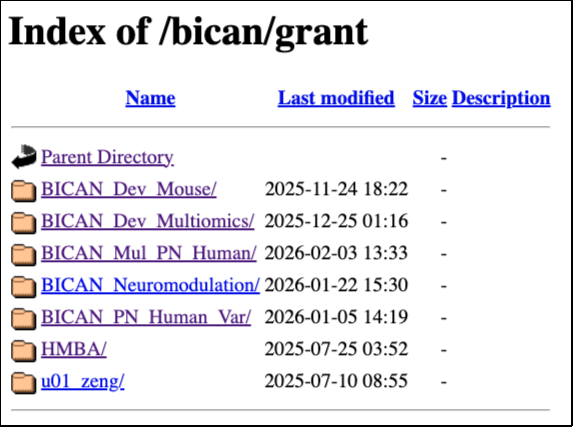
The open access BICAN data are released at https://data.nemoarchive.org/. Grant specific data can be accessed by navigating through the data directory structure. The top-level (root) directory is organized by program. Within each program, data are further organized by grant, lab, modality, subspecimen type, technique, species, data type and aliquot name. Please note that the HTTPS location contains files released during the continuous release process (i.e., data automatically released after an embargo period ends). Consequently, some files may not be included in a Rapid Release collection.
Individual files can be downloaded directly from the browser by right-clicking the file and selecting “Copy” or “Save link as.” For downloading via command line, use any online tools that support http downloads such as Wget or cURL. Only cumulative and meta-cumulative collections with open access data are linked with HTTPS file locations.
Accessing NeMO Collections from Allen’s Brain Knowledge Platform (BKP)
There are two ways of finding NeMO collection data at Brain Knowledge Platform Data Catalog:
NeMO Collections linked in BKP Project Pages
Metadata search and file manifest retrieval from specimen table of BKP’s Data Catalog
NeMO Collections linked in BKP Project Pages
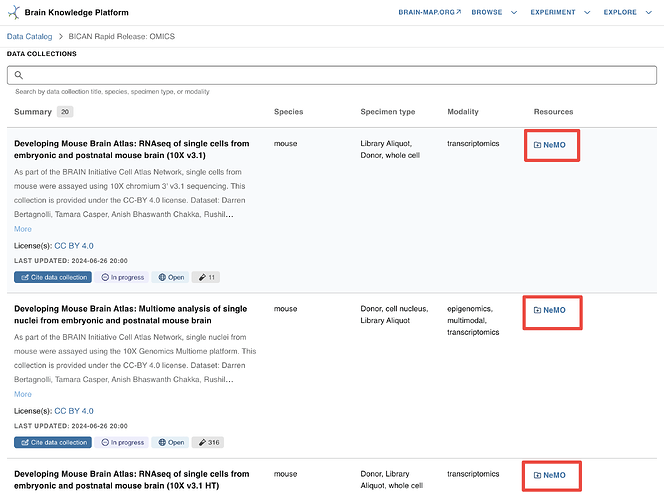
The NeMO collection landing page URLs are linked in each collection listed in “DATA COLLECTIONS” section in the project page - “BICAN Rapid Release Inventory: Single cell transcriptomics and epigenomics”. Click on the “NEMO” links to navigate to the corresponding collection landing pages where you will find links to collection BDBag and HTTPS path for file download. Refer to the document with details on downloading files using a BDBag. Details on accessing files from HTTPS links are in the section “HTTPS location” of this document. Allen Institute’s documentation on finding data for collections is here.
Metadata Search and File Manifest Retrieval from Specimen table of BKP’s Data Catalog
The file manifest downloaded from Data Catalog containing the HTTPS file paths can be used as an input into the Portal-Client tool to download the files after reformatting the manifest. Instructions can be found here in the Allen Brain Map Community Forum.
Finding AAVs for targeting Cholinergic cell populations in the striatum
Discover how to find AAV vectors for targeting cholinergic neurons in the striatum. Learn viral vector selection for precise cell targeting.
As a scientist doing research on the Basal Ganglia, I’m looking for viral genetic tools that allow me to specifically target cell types in the striatum for an upcoming set of experiments.
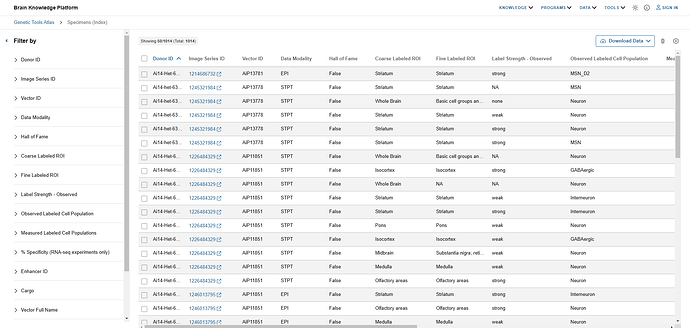
I use the Genetic Tools Atlas from the Allen Institute to explore whether Allen scientists have publicly shared suitable tools.
I review the provided experiment metadata. I see that at a glance there are several enhancer-adeno-associated viruses (AAVs) targeting the striatum but also ones for many other brain regions.
Step 2: I use filters to reduce the list to only experiments that target the striatum.
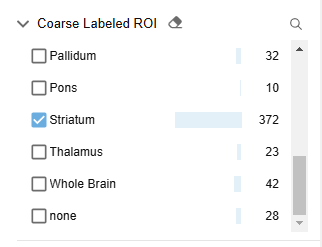
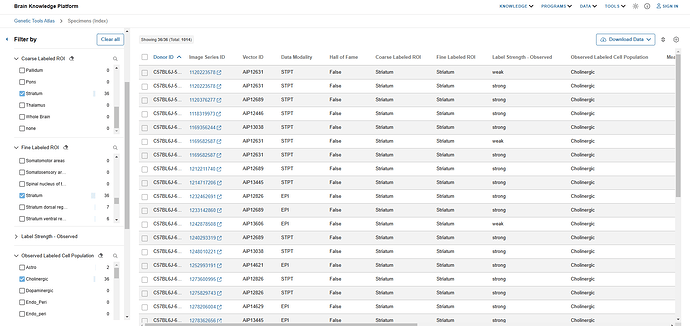
I open the filter panel and find the “Coarse Labeled ROI” filters. I scroll down and select the checkbox next to “Striatum“. I see that there are 372 results that match my query.
Step 3: I filter further to a “finer labeled ROI” & cell type of interest.
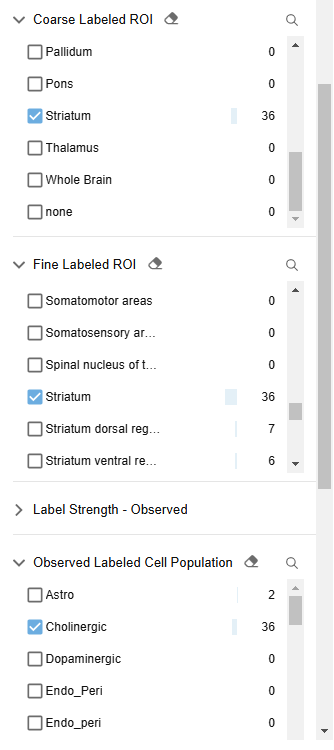
I apply an additional filter to narrow the data to a fine labeled ROI of “Striatum“ and an observed labeled cell population of “Cholinergic“. I’ve narrowed down my search to 36 highly relevant experiments.
Step 4: I review “Hall of Fame” entries and related image data
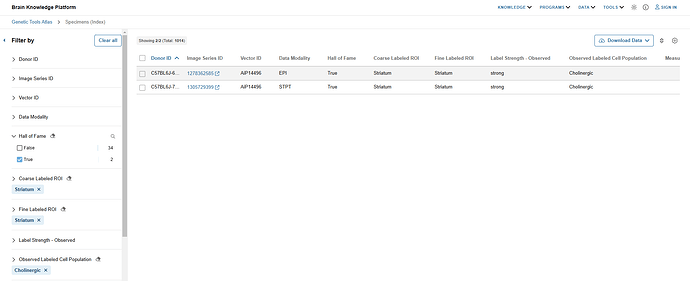
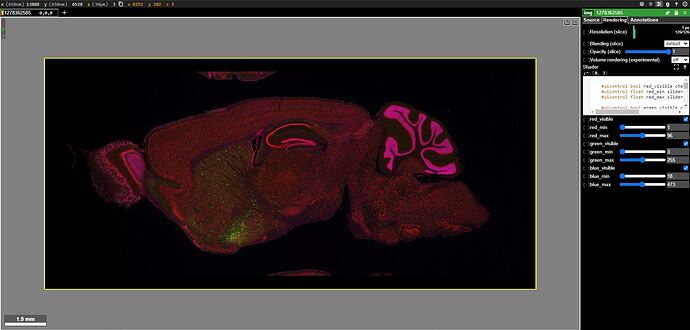
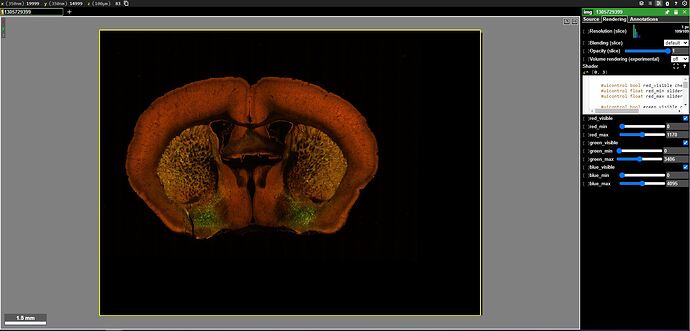
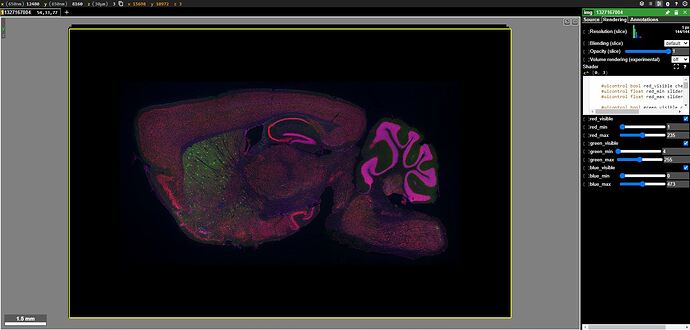
I notice that 2 results use AAVs that were designated as particularly notable, i.e. “Hall of Fame”. I review their EPI & STPT image data. I use Neuroglancer to see how these enhancers are expressed in my regions and cell populations of interest.
Useful Hot-Keys for Neuroglancer:
“ctrl + scroll” zoom
“R” and “E” rotate
“Z” locks to the nearby “straight” orientation
“scroll” move through volume for STPT images
“Shift + scroll” fast move through volume for STPT images
Step 5: I consider the enhancer suitable for my purposes and order it on Addgene - Vector ID lookup
The expression pattern meets my expectations and I decide to use it in future experiments.
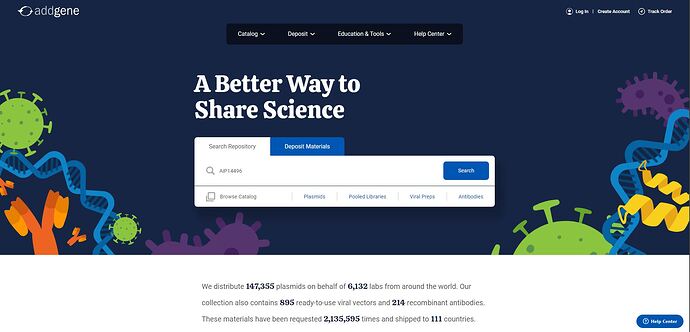
I go to http://addgene.org . I type in the Vector ID “AiP14496“ I received from Genetic Tools Atlas and hit the Search button.
The results return one relevant enhancer:
I click into the enhancer entry to access further details and ordering information.
Step 6: I explore non “Hall of Fame” entries and their image data
I explore the other results and find AiP13038 and its related image data. I use Neuroglancer to see how these enhancers are expressed in my regions and cell populations of interest. I note that its Addgene ID is listed directly in the Genetic Tools Atlas.
Step 7: I consider the enhancer suitable for my purposes and order it on Addgene - Addgene ID lookup
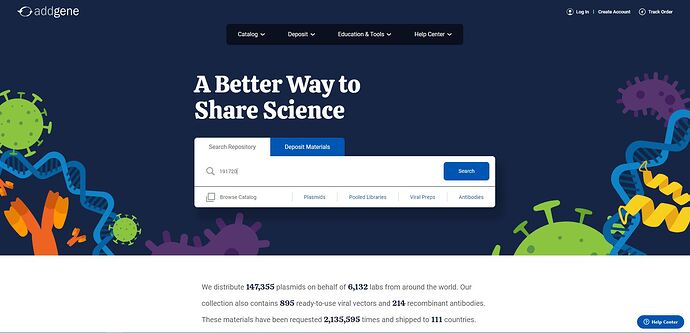
I go to addgene.org. I type in the enhancer ID “191720“ I received from Genetic Tools Atlas and hit the Search button.
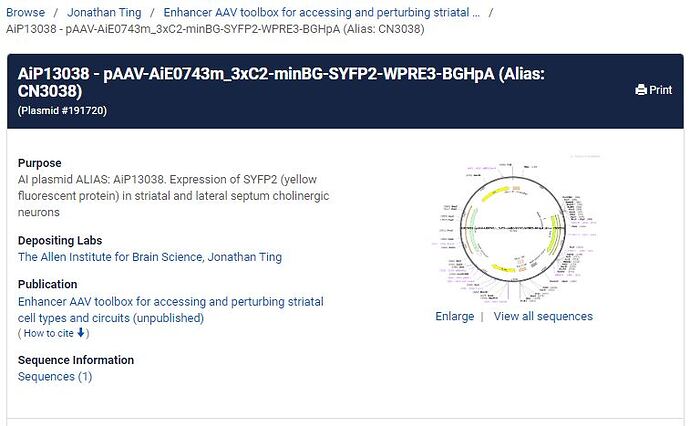
The results return one relevant enhancer:
I click into the enhancer entry to access further details and ordering information.